Video: Kemp ESP as a TMG replacement

Well done video on replacing TMG fun functionality with Kemp ESP:

I just got the beta VM setup, but haven’t had time yet to configure it for Exchange, SharePoint, & RDP access yet.

1st mini post to blog using iPhone app. Currently, month+ total now, laid up in bed from back surgery yesterday (5/22/2013).

Posted in Exchange, Technical | Tagged , , | Leave a comment

Microsoft Certification Exam Offers End May 31

I just saw this in my monthly Microsoft partner e-mail:

Microsoft Certification Exam Offers End May 31
If you are preparing for Microsoft certification exams to update your skills for the latest products or to apply to the requirements for a competency, take advantage of our exam offers. Purchase a pack of exams for up to 40% off and, for a limited time, get a free second chance to pass the exams if needed. Offers end May 31, and you must take your exams by December 31.

I’m currently have my MCSE: Messaging certification in Windows 2008 and Exchange 2010, but plan on getting this updated to Windows 2012 and Exchange 2013 this year. With the current offer you can get a voucher number for all five of the required test and don’t have to pay for them until you register for your 1st test. All testing must be done by 12/31/2013, so you have over six months to study up and to take the test. In addition, until 5/31 you get the “Second Shot” option, where you can retake the test for free if you fail the 1st time. So if you are ready to take your test now you can get a package of 5 vouchers for around $250, don’t recall the exact amount and can’t find the page that showed the cost for the voucher packs, and have the Second Shot option on them until the 31st.

I plan on taking the Windows 2012 410 & 411, Exchange 2013 341 & 342 ones without studying and seeing how I do. I think I’ll need to study up some for the Windows 2012 412 one and guessing I might need to re-take the Exchange 342 one since I’ve done very little with Exchange 2013 in production. When I re-certified on Windows 2008 and Exchange 2010, I took all of the test over a two day period, at TechEd 2010, without studying. I passed them all by a wide margin, except for the advanced Exchange 2010 one, which I just passed by about 50 points. At that time I had only done a few production deployments of Exchange 2010 so I had expected to have to re-take that one going into it. To be fair, I had been working with Exchange 2010 for close to two years, going back to the betas and had been to two Microsoft MVP summits, where three solid days were spent with the product team talking about Exchange 2010. So I wasn’t exactly going into these test with minimal knowledge.

List of training and test for MCSE: Messaging for Exchange 2013:
http://www.microsoft.com/learning/en/us/mcse-messaging-certification.aspx#fbid=T1ElL-2N24b

Voucher landing page: https://www.prometric.com/en-us/clients/Microsoft/Promotions/MPN-landingpg-2012/index.html

VOUCHER EXPIRATION:
These vouchers expire on Dec 31st, 2013. All exams, including retakes, in the pack must be taken by December 31st, 2013.

  • Please note: you will pay for the full price of the set of exams at the time of registering for your first exam.
  • All other exams in the set of exams using the same voucher code will be free after that.
Posted in Exchange, Microsoft, Technical | Tagged , | Leave a comment

Exchange 2013 server role calculator is out!

The Exchange 2013 “Server Role Requirements Calculator” was released today. New to the 2013 version is support for both the client access and server roles, which are the only two roles in 2013. The general guidance is to deploy multi-role servers with 2013, so for most organizations this new support won’t really matter.

Also new is transport sizing (part of both roles, but mainly just affects the Mailbox role) and multiple DBs per JBOD volume. There are also many improvements for high availability support.

GREAT JOB Ross and team!!!

For full details see Ross Smith’s EHLO blog post here: http://blogs.technet.com/b/exchange/archive/2013/05/14/released-exchange-2013-server-role-requirements-calculator.aspx

Download here

For what’s New and Cool in Exchange 2013 see: https://blog.jasonsherry.net/2012/07/31/new_cool_exchange_2013/

Posted in Exchange, Microsoft, Technical | Tagged , | Leave a comment

Known Exchange 2010 SP3 RU2 issues

11/25/13 Update: Exchange 2010 SP3 RU2 release: https://blog.jasonsherry.net/2013/11/25/exchange-2010-sp3-ru3-2013-cu3-release/  (I will move my “Known Issues” list to this blog post once I have some to list)

8/13/13 Update: Exchange 2010 SP3 RU2 released: EHLO Blog Post | Download

7/12/13 Update: I’ve started a similar list for Exchange 2013 CU2 issues on this blog post: https://blog.jasonsherry.net/2013/07/09/exchange-2013-rtm-cu2-released/

5/30/13 Update: Exchange 2010 SP3 RU1 released: EHLO Blog Post | Download

This is not a full list of issues by any means, only those that I’m aware of and feel are important enough to share. In addition, I’m only listing issued that are new\only in Exchange 2010 SP3 and that there  is a Microsoft  KB or multiple community posts about it.

If you know of others please post them in the comments! I’ll update this post as I come across new info.

  • AllowCrossSiteRPCAccess reverts back to $False after running Set-DatabaseAvailabilityGroup
  • On-line Outlook or OWA users unable to soft delete some messages
    • Impact: Minor – Limited to Outlook in on-line mode or OWA with embedded WAV files, generated by Voice Mail, or PDF files, generated by scanners\copies.
      • Very few people have run into this issue and the only ones who have filed embedded in emails as a WAV or PDF. I have clients with Exchange UM and other solutions who haven’t seen this issue, so may just be limited to Cisco UM and Xerox scanners, where the problem has been seen.
    • Workarounds:
      • Do SHIFT-Delete, change to cache mode, call MS PSS for fix
      • Install SP3 RU1
    • More info: http://support.microsoft.com/kb/2822208
  • When activating a database on another server it may cause the status to show failed on the original server
    • Impact: Unknown – I haven’t seen this issue or spoken to anyone who has
    • Workaround: Depends, but start by disabling 8DOT3 name creation: fsutil 8DOT3name set. See KB for more details
    • More info: http://support.microsoft.com/kb/2837926
  • Messages get stuck in the poison queue and transport crashes
    • Note: This is an issue with Exchange 2010 SP3 RU1 only
    • Impact: HIGH <If you use a disclaimer transport rule>
      • The issue is caused by a transport rule (disclaimer) attempting to append the disclaimer to the end of HTML formatted messages.   When this occurs, messages will be placed in the poison queue and the transport service will crash with an exception.
    • Workarounds:
      • Disable the disclaimer transport rule
      • Install SP3 RU2
  • Some cmdlets fail in PowerShell ISE after an upgrade to Exchange Server 2010 SP3
    • Impact: Minor – Only an issue with PowerShell ISE – Added 7/17/13
      • This is really an issue with local PowerShell not working, while it may have worked in the past only remote PowerShell is supported and it seems changes in SP3 enforce this
      • See KB2859999 for more details
      • Exchange cmdlets fail in ISE after running “Add-PSSnapin Microsoft.exchange.powershell.e2010”
        • Example: (Local PowerShell session being used)
          Add-PSSSnapin Microsoft.Exchange.Management.PowerShell.E2010 PS H:\> Test-WebServicesConnectivity -ClientAccessServer
          WARNING: An unexpected error has occurred and a Watson dump is being generated: Operation is not valid due to the current state of the object. Test-WebServicesConnectivity : Operation is not valid due to the current state of the object.
      • Workaround: Open a remote session to an Exchange server by using the following cmdlets at the beginning of the ISE script
        • Example:
          $Session = New-PSSession -ConfigurationName Microsoft.Exchange -ConnectionUri http:///PowerShell/ -Authentication Kerberos
          import-pssession $session
          add-pssnapin microsoft.exchange*
          test-webservicesconnectivity -clientaccessserver CASSERVER –trustanysslcertificate
  • On Windows 8.1 or 2012 R2 OWA comes up in Lite mode (9/19/13)
    • This is a known issue with IE11, which comes with Windows 8.1 and 2012 R2
      • Workaround: Use Firefox or Chrome
      • 2010 SP3 RU3 & 2013 CU3 should fix this issue

For general Exchange 2013 questions or to discuss non-support topics join the “Microsoft Exchange 2013” Facebook group I admin: https://www.facebook.com/groups/MSEX2013

For community based support goto TechNet forums: http://social.technet.microsoft.com/Forums/exchange/

Posted in Exchange, Microsoft, Technical | Tagged , | 30 Comments

Exchange 2010 SP3 sets AllowCrossSiteRPCClientAccess back to false

If you have any scripts, like those used during the failover process, that use this cmdlet for Exchange 2010 you need to update them to set this value each time.

Just add “–AllowCrossSiteRPCClientAccess $True” to the cmdlet line when calling Set-DatabaseAvailabilityGroup, this assumes  you want to allow cross site RPC access without requiring your users to restart Outlook when their active database is moved to another AD Site.

Set-DatabaseAvailabilityGroup –AllowCrossSiteRPCClientAccess $True.

I’m pretty sure  I’ve seen this value reset back to $False with SP2 (RU unknown) also, so this “bug” might have existed before SP3. This switch was added, or really it started working, in SP2 RU3.

See this blog post for more details:
http://blogs.technet.com/b/rmilne/archive/2013/05/08/exchange-2010-dag-allowcrosssiterpcclientaccess-reverts-to-false.aspx

For general Exchange 2013 questions or to discuss non-support topics join the “Microsoft Exchange 2013” Facebook group I admin: https://www.facebook.com/groups/MSEX2013

For community based support goto TechNet forums: http://social.technet.microsoft.com/Forums/exchange/

Posted in Exchange, Microsoft, Technical | Tagged | 4 Comments

Using Exchange Address Book Policies to hide some users from others

The steps in this article can be used to hide some or all other users from other users using Address Book Policies (ABP) in Exchange 2010 (SP2+). This was required for one of my clients, who had some shared mailboxes that were used by an external company. They didn’t want the external company to be able to see all of their users and groups when using the shared mailboxes.

The steps below will setup a new ABP that can be applied to select mailboxes, so they have a limited view of the GAL. Mailboxes that don’t have an ABP applied to them will still use the default GAL. Following these steps won’t prevent users in the default GAL from seeing the mailboxes that have the new ABP applied to them. The quick solution for this is to just hide the mailboxes, but if this isn’t a workable option multiple ABPs will be needed. To limit users so they don’t see other users you will need to create at least two ABP and the different ABP to the different sets of mailboxes, for details on how to do this see this article by Steve Goodman: http://searchexchange.techtarget.com/tip/How-to-implement-Exchange-address-book-policies.

Basic Steps

  1. Create a new GAL for Tailspin
  2. Create a new Address Lists for Tailspin mailboxes·
    – At a minimum two Address Lists are required, one for mailboxes and another for rooms
  3. Create a new Offline Address Book for Tailspin
  4. Create new ABP and select the new GAL, OAB, and rooms list
  5. Assign the new ABP to the mailboxes, that you want to have a limited view of the GAL
  6. Set attribute(s) on the objects you want to be visible in the new ABP
    – This can done using one of the common properties, like Company, CustomAttribute1-15, or any other attributes supported by the –RecipientFilter parameter

Example PowerShell steps

Create new GAL for Tailspin:

  • This step can only be done via PowerShell, all the rest of these steps can be done in the EMC.
New-GlobalAddressList “TailSpin Global Address List” -RecipientFilter {(CustomAttribute1 -eq “TailSpin”)} | Update-GlobalAddressList

Create new Address List(s) for Tailspin:
Only one Address List is required but one can be created for each object type in Exchange if needed. This can be created from EMC or EMS.
New-AddressList “TailSpin Mailboxes” -RecipientFilter {((CustomAttribute1 -eq “TailSpin”) -and (RecipientType -eq ‘UserMailbox’))} | Update-AddressList

A rooms address list is also required when creating a ABP, so you must create one for TailSpin or you could use the default one.
New-AddressList “TailSpin Rooms” -RecipientFilter {((CustomAttribute1 -eq “TailSpin”) -and (Alias -ne $null) -and ((RecipientDisplayType -eq ‘ConferenceRoomMailbox’) -or (RecipientDisplayType -eq ‘SyncedConferenceRoomMailbox’)))} | Update-AddressList

Create new OAB for Tailspin:
New-OfflineAddressBook “TailSpin Offline Address Book” -AddressLists “TailSpin Global Address List”

Create new Address Book Policy:
New-AddressBookPolicy -Name “TailSpin Address Book Policy” -AddressLists (Get-AddressList TailSpin*) -OfflineAddressBook “TailSpin Offline Address Book” -GlobalAddressList “\TailSpin Global Address List” -RoomList “\TailSpin Rooms”

Set custom attribute on mailboxes, groups, or other objects that should be included in the new GAL:
The cmdlet below will update all mailboxes in the TailSpin OU to have CustomAttribute1 = TailSpin, which is the filter used on Address Lists created above.

Get-Mailbox -OrganizationalUnit company.com/TailSpin | Set-Mailbox -CustomAttribute1 TailSpin

Set the mailboxes to use the new ABP:
Get-Mailbox -Filter {(CustomAttribute1 -eq “TailSpin”)} | Set-Mailbox -AddressBookPolicy “TailSpin Address Book Policy”

Now if everything is setup correctly, when “TailSpin” user’s login and browse the GAL they will only see other TailSpin users.

Posted in Exchange, Microsoft, Technical | Tagged | 2 Comments

#IamMEC – Microsoft Exchange Conference is coming back, but not till April 2014

Microsoft has started another teaser campaign for MEC again. For last year’s MEC they started out with an cryptic e-mail that had an IP address in it. If you went to the IP address you would get a very basic MEC page, which later became http://iammec.com.

Currently they have a live twitter feed on the #IamMEC hash tag, some pics and content (“videos“, really just PPTs with audio), and links to several Exchange related site. Microsoft is working to make the iammec site a place to get the latest information and content on Exchange. No further details on MEC 2014 yet, all we know is that it will be in April right now. This gives Microsoft another year to get Exchange 2013 stable and feature complete.

See my post from March 2012 for some history on MEC and my use of Exchange: https://blog.jasonsherry.net/2012/03/06/mec-is-back-in-2012/

For an overview of the two sessions I gave (Personal Archive and Retention Policies | Migrating from another forest to 2010 without 3rd party tools), twice, at MEC 2012 and a link to the related PPTs & DOC see: https://blog.jasonsherry.net/2012/08/17/speaking-at-mec-2012/

I know I will be at MEC 2014, hope to see many of my peers, past, and future clients 🙂

Posted in Exchange | Tagged | Leave a comment

Script: Site-Failover.ps1 – Exchange 2010 failover script with health checks

2/25 Update: Add better support for updating Send Connectors. Script now supports an array of Send Connects with a normal cost and DR cost, to be used when normal route may not work. Code below has NOT been updated. Get the latest version from: http://izzy.org/Scripts/Exchange/Admin/Failover.ps1

I created this script several months ago for a client and it took about 18 hours of time to create and fully test initially. I recently made a few modifications to it and decided to post it today.

This script is designed to do a partial failover, where DAG membership is not changed, and a full failover that does remove DAG members. It supports both planned and unplanned failovers, where the servers are off-line. It will check the health of database replication and the replication infrastructure, using the Test-ReplicationHealth cmdlet. If too many logs, 5 by default, are found in the CopyQueueLength it will wait five seconds and check the queue length again. If the queues have not decreased it will prompt the user if they want to wait and check again or exit. If any CopyQueueLength are higher than 50, by default, it will abort so the user can figure out why. This is in addition to moving database, updating DNS, AD, etc.

Key things done by the script

  1. Check health of DBs
  2. Check CopyQueueLength
  3. Check replication infrastucture health
  4. Planned and unplanned (-ConfigurationOnly switch used) failovers
  5. Temporary (DAG left intack) and extneded failovers (DAG members removed)
  6. Move databases to DR\secondary site
  7. Update Public Folder datasebase value on Mailbox databases
  8. Update DNS for records that need to be changed to point to DR site
  9. Update Send Connector costs
  10. Forcing AD replication
  11. Calls RedistributeActiveDatabases.ps1 when failing back, code included for enviroments where this script won’t work
  12. Users PowerShell Transcript function to log all actions to a file
  13. Log only mode ($MakeChanges=$False/$True)

Due to the complexy and many factors this script will probally be updated many times in the future and will need to be customized for your enviroment. Currently it doesn’t support dynamically discovery servers and Public Folder databases, so you will need to update AD Site, Server names, IP addressess, Public Folder databases, and other settings\names at the top of the script at the minimum.

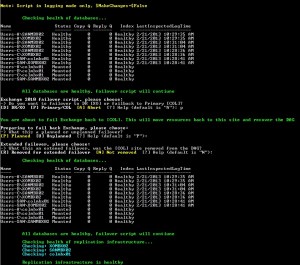
Screen shot of it running, in a small enviroment:
Failover-Script
Source: http://izzy.org/Scripts/Exchange/Admin/Failover.ps1

# Exchange 2010 site failover script w/ health checks
# Created by Jason Sherry | izzy@izzy.org | http://jasonsherry.org
# Created 9/21/2012, Last Updated 2/21/2013
#		2/20: Added $MakeChanges switch, commented out code required for Journal mailbox databases (where Index state always = Failed)
#		2/21: Minor clean-up

# Source: http://izzy.org/Scripts/Exchange/Admin/Failover.ps1

#TO DOs
# - Add option to not exit script, when doing post failover checks when an issue is found
# - Checks for ReplayQueueLength & ContentIndexState
# - Add logging to file (In addition to what has been added below that will show up in transcript file)
# - Get server names, instread of having a fixed number when doing cluster calls
# - Add index repair option
# - Get PF DB names, instead of hard coding
# - Add error handling, Try\Trap

$ErrorActionPreference = "SilentlyContinue"
$MakeChanges = $False

#Replication Limits
$CopyQueueLengthWarn = 5
$CopyQueueLengthMax = 50
$ReplayQueueLengthWarn = 5
$ReplayQueueLengthMax = 50

#AD & DAG Info
$PrimaryADSite = "COL"
$DRADSite = "DR"
$DAGName = "DAG01"
## TO DO: Replace with code to get dynamic list of servers
$PrimaryServers = @("COLMBX01","COLMBX02","COLMBX03") # Array of server names, 1st server listed will be the PAM
$DRServers = @("DRMBX01","DRMBX02")
$PrimaryPFDB = "Public Folders COL02"
$DRPFDB = "Public Folders DR02"
$PrimaryDC = "colcorpdc01.corp.company.com"

#File Witness Information
$PrimaryWS = "COLHYPERV01"
$PrimaryWD = "E:\DAG-FSW\DAG01"
$AltWS = "DRHYPERV01"
$AltWD = "E:\DAG-FSW\DAG01"

#DNS Values to update
$DNSZone = "company.com"
$DNSServers = @("10.10.24.4","10.10.16.41","10.10.34.3","10.10.32.8") # Multiples can be listed to help reduce latnecy due to AD replication
$PrimaryDNSRecords = @(("mail","10.10.24.33"),("COLRPCmail","10.10.24.33"),("um","10.10.24.30"))
$DRDNSRecords = @(("mail","10.10.12.30"),("COLRPCmail","10.10.12.30"),("um","10.10.12.30"))

$SendConnector = ""

Start-Transcript -Path "Failover.log" -Append -NoClobber
clear

If (!$MakeChanges) {Write-Host `n'Note: Script in logging mode only, $MakeChanges=$False'`n -ForegroundColor Yellow}

Function Failover {
	Write-Host "`n`nWARNING: You are about to fail or move Exchange to the [$DRADSite] site!" -ForegroundColor Red

	$Caption = "Preparing to failover Exchange, please choose:"
	$Message = "-> Is this a planned or unplanned failover?"
	Switch (InputPrompt -Caption $Caption -Message $Message -Choice "&Planned", "&Unplanned","&Abort failover" -Default 0) {
		0 { $PlannedFailover = $True
			$extendedFailover = $True }
		1 { $PlannedFailover = $False }
		2 { CloseScript }
	 }

	CheckDBHealth $PlannedFailover
	ReplicationHealth $PlannedFailover

	If ($PlannedFailover) {
		$Caption = "Will this be a extended failover, please choose:"
		$Message = "-> In you contiune with an extended failover, the servers in the [$PrimaryADSite] site will be removed from the DAG and not kept up to date."
		Switch (InputPrompt -Caption $Caption -Message $Message -Choice "&Yes","&No","&Abort" -Default 1) {
			0 { $extendedFailover = $True }
			1 { $extendedFailover = $False }
			2 { CloseScript }
		}
	}

	$DAG = Get-DatabaseAvailabilityGroup

	If (!$extendedFailover) {
		$Caption = "Change File Share Witness to [$AltWS], please choose:"
		$Message = "-> If the current FSW server [" + $dag.WitnessServer.HostName + "] will be off-line it should be changed."
		Switch (InputPrompt -Caption $Caption -Message $Message -Choice "&Yes","&No","&Abort" -Default 0) {
			0 {
				Write-Host "`n`tChanging WitnessServer to [$AltWS] and WitnessDirectory to [$AltWD]"
				If ($MakeChanges) {Set-DatabaseAvailabilityGroup -Identity $DAGName -WitnessServer $AltWS -WitnessDirectory $AltWD}
			}
			1 {}
			2 { CloseScript }
		 }
	}
	MoveResources $True $extendedFailover $PlannedFailover
}

Function Failback {
	Write-Host "`n`nYou are about to fail Exchange back to [$PrimaryADSite]. This will move resources back to this site and recover the DAG" -ForegroundColor Green

	$Caption = "Preparing to fail back Exchange, please choose:"
	$Message = "-> What this a planned or unplanned failover?"
	Switch (InputPrompt -Caption $Caption -Message $Message -Choice "&Planned", "&Unplanned" -Default 0) {
		0 { $PlannedFailover = $True
			$Caption = "Extended failover, please choose:"
			$Message = "-> What this an extened failover, was the [$PrimaryADSite] site removed from the DAG?"
			Switch (InputPrompt -Caption $Caption -Message $Message -Choice "&Removed for extended failover", "&Not removed" -Default 1) {
				0 { $extendedFailover = $True }
				1 { $extendedFailover = $Flase }
			 }
		}
		1 { $PlannedFailover = $False
			$extendedFailover = $True }
	 }

	CheckDBHealth $PlannedFailover
	ReplicationHealth $PlannedFailover

	$DAG = Get-DatabaseAvailabilityGroup
	$CurrentFSW = $dag.WitnessServer
	If ($CurrentFSW -ne $PrimaryWS -and $CurrentFSW -NotContains $PrimaryWS) {
		Write-Host "`nChanging witness server settings to : [$PrimaryWS] & : [$PrimaryWD], current server: [$CurrentFSW]" -ForegroundColor Cyan
		If ($MakeChanges) {Set-DatabaseAvailabilityGroup -Identity $DAGName -WitnessServer $PrimaryWS -WitnessDirectory $PrimaryWD}
	}
	MoveResources $False $extendedFailover $PlannedFailover
}

Function InputPrompt {
#From: http://blogs.technet.com/b/jamesone/archive/2009/06/24/how-to-get-user-input-more-nicely-in-powershell.aspx
Param(   [String[]]$choiceList,
         [String]$Caption="Please make a selection",
         [String]$Message="Choices are presented below",
         [int]$default=0  )
   $choicedesc = New-Object System.Collections.ObjectModel.Collection[System.Management.Automation.Host.ChoiceDescription]
   $choiceList | foreach  { $choicedesc.Add((New-Object "System.Management.Automation.Host.ChoiceDescription" -ArgumentList $_))}
   $Host.ui.PromptForChoice($caption, $message, $choicedesc, $default)
}

Function CheckQueues {
Param ([array]$Databases, [Bool]$ExitOnIssue=$False)
	ForEach ($Database in $Databases) {
		$CopyQueueLength1 = $Database.CopyQueueLength
		$DatabaseName = $Database.Name
		write-host "`t`t`nRefreshing in 5 seconds`n" -Foregroundcolor Yellow
		start-sleep -s 5
		$SecondStatus = Get-MailboxDatabaseCopyStatus $Database.Name
		$CopyQueueLength2 = $SecondStatus.CopyQueueLength
		If ($CopyQueueLength2 -ge $CopyQueueLength1 -or $CopyQueueLength2 -gt $CopyQueueLengthWarn ) {
			$Caption = "Database [$DatabaseName] CopyQueueLength is not decreasing or still > $CopyQueueLengthWarn : `n`tPrevious value: [$CopyQueueLength1], current value [$CopyQueueLength2]"
			$Message = ""
			Switch (InputPrompt -Caption $Caption -Message $Message -Choice "&Wait another 5 seconds","&Contiune failover","&Abort failover" -Default 0) {
				0 {CheckQueues $Database $ExitOnIssue}
				1 {Return}
				2 {If ($ExitOnIssue) {CloseScript}}  }
		}
	}
}

Function CheckDBHealth {
	Param ( [Bool]$ExitOnIssue=$False)
	Write-Host "`n`tChecking health of databases..." -Foregroundcolor Green
	$WarningDBs = @()
	$BadDBs = @()

	$DBsCopyStatus = Get-MailboxDatabase | Get-MailboxDatabaseCopyStatus
	## Bug\issue with formating that throws an error when doing the line below sometimes| ft
	Try {
		$DBsCopyStatus | Sort-Object Status,Name | ft name, status, @{label="Copy Q";expression={$_.CopyQueueLength}}, @{label="Reply Q";expression={$_.ReplayQueueLength}}, @{label="Index";expression={$_.contentIndexState}}, LastInspectedLogTime -Auto
	}
	Catch {
		Write-Host "Hit a stupid PowerShell formatting bug, unable to display status, run: `n`t[Get-MailboxDatabase | Get-MailboxDatabaseCopyStatus]" -Foregroundcolor Magenta
	}
#	Get-MailboxDatabase -ea Continue | Get-MailboxDatabaseCopyStatus | Sort-Object Status,Name | ft name, status, @{label="Copy Q";expression={$_.CopyQueueLength}}, @{label="Reply Q";expression={$_.ReplayQueueLength}}, @{label="Index";expression={$_.contentIndexState}}, LastInspectedLogTime -Auto

	ForEach ($DBCopyStatus in $DBsCopyStatus) {
		If ($DBCopyStatus.Status -ne "Healthy" -And $DBCopyStatus.Status -ne "Mounted") {
			$BadDBs += $DBCopyStatus }
	}
	If 	($BadDBs.Count -gt 0) {
		Write-Host "The following database(s) are not in a healthy state, script will exit:" -Foregroundcolor Yellow
		ForEach ($DB in $BadDBs) {
			$DB | select  Name, status, CopyQueueLength, ReplayQueueLength
		}
		If ($Mode = "Failover") {CloseScript}
	}
	$BadDBs = @()
	ForEach ($DBCopyStatus in $DBsCopyStatus) {
		If ($DBCopyStatus.CopyQueueLength -ge $CopyQueueLengthWarn -and $DBCopyStatus.CopyQueueLength -lt $CopyQueueLengthMax) {
			$WarningDBs += $DBCopyStatus }
		If ($DBCopyStatus.CopyQueueLength -ge $CopyQueueLengthMax) {
			$BadDBs += $DBCopyStatus }
	}
	If 	($BadDBs.Count -gt 0) {
		Write-Host "`n*** FAILED *** The following database(s) have too large of a CopyQueueLength ( > $CopyQueueLengthMax ), the script will now exit:" -Foregroundcolor Red
		ForEach ($DB in $BadDBs) {
			$DB | select  Name, CopyQueueLength, ReplayQueueLength
		}
		CloseScript
	}
	If 	($WarningDBs.Count -gt 0) {
		Write-Host "The following database(s) have a CopyQueueLength > $CopyQueueLengthWarn " -Foregroundcolor Yellow
		ForEach ($DB in $WarningDBs) {
			$DB | select  Name, CopyQueueLength, ReplayQueueLength
		}
		CheckQueues $WarningDBs $ExitOnIssue
	}
	If ($BadDBs.Count -eq 0 -and $WarningDBs.Count -eq 0) {
		Write-Host "`tAll databases are healthy, failover script will contiune" -Foregroundcolor Green }
	Else {
		Write-Host "`nSome database were found to have logs in their queue, but user has choosen to contiune with failover" -Foregroundcolor Yellow	}
}

Function ReplicationHealth {
	Param ( [Bool]$ExitOnIssue=$False)
	Write-Host "`n`tChecking health of replication infrastructure..." -Foregroundcolor Green
	$FailedChecks = @()
	$DAG = Get-DatabaseAvailabilityGroup $DAGName
#	Write-Host "Server Count: "  $DAG.Servers.Count
	ForEach ($Server in $DAG.Servers) {
		Write-Host "`tChecking: $Server " -Foregroundcolor Cyan
		$FailedChecks += Test-ReplicationHealth $Server | ? {$_.Result -NotLike "Passed"}
	}
		If 	($FailedChecks.Count -gt  $DAG.Servers.Count) {
			Write-Host "`n*** FAILED *** The following replication health checks have failed:" -Foregroundcolor Red
			$FailedChecks | ft -wrap
			If ($ExitOnIssue) {CloseScript}
		}
	Write-Host "`n`tReplication infrastructure is healthy" -Foregroundcolor Green
}

Function MoveResources {
Param ($Failover,$extendedFailover,$PlannedFailover )
	Write-Host "`nFailover: $Failover | Extended failover: $extendedFailover | Planned failover: $PlannedFailover" -Foregroundcolor Blue

	If ($Failover) {
		$TargetServers = $DRServers
		$TargetSite = $DRADSite
		$TargetPFDB = $DRPFDB
		$DNSRecords = $DRDNSRecords
	}
	Else {
		$TargetServers = $PrimaryServers
		$TargetSite = $PrimaryADSite
		$TargetPFDB = $PrimaryPFDB
		$DNSRecords = $PrimaryDNSRecords
	}
	$PrimaryServer = $TargetServers[0]
	Write-Host "`nMoving the PAM to [$PrimaryServer] " -ForegroundColor Green
	If ($MakeChanges) {cluster.exe group "Cluster Group" /moveto:$PrimaryServer}
	write-host "`nActivating all mailbox databases in the [$TargetSite] AD Site" -ForegroundColor Green

	# Do not attempt to move databases already active on the DR server
	If ($Failover -And !$extendedFailover) {
		If ($MakeChanges) {Get-MailboxDatabase |  ? {$_.Server -ne $PrimaryServer} | Move-ActiveMailboxDatabase -ActivateOnServer $PrimaryServer -Confirm:$false}
	}
	ElseIf ($Failover -And ($extendedFailover -Or !$PlannedFailover)) {
		If (!$PlannedFailover) {
			$Caption = "Status of [$PrimaryADSite] site"
			$Message = "Are the Exchange servers in [$PrimaryADSite] on-line AND available from [$DRADSite]? If they are unavailable the script will not attempt to contact them."
			Switch (InputPrompt -Caption $Caption -Message $Message -Choice "&On-line","&Unavailable\off-line" -Default 0) {
				0 { $Unavailable = $True }
				1 { $Unavailable = $False }
			}
		}
		If (!$Unavailable -Or $extendedFailover) {
			Write-Host "Stopping and removing the servers from the DAG in [$PrimaryADSite]." -ForegroundColor Green
			If ($MakeChanges) {Stop-DatabaseAvailabilityGroup $DAGName -ActiveDirectorySite $PrimaryADSite -confirm:$false}
		}
		Else {
			Write-Host "Removing servers from the DAG in [$PrimaryADSite] in the AD only." -ForegroundColor Green
			If ($MakeChanges) {Stop-DatabaseAvailabilityGroup $DAGName -ActiveDirectorySite $PrimaryADSite -confirm:$false -ConfigurationOnly}
		}

	}
	ElseIf ($extendedFailover -And !$Failover) {
		Write-Host "Starting DAG in [$PrimaryADSite]." -ForegroundColor Green
		If ($MakeChanges) {Start-DatabaseAvailabilityGroup $DAGName -ActiveDirectorySite $PrimaryADSite -confirm:$false}
	}

	If ($extendedFailover) {
		ForEach ($Server in $TargetServers) {
			Write-Host "`nStopping the cluster service on $Server." -ForegroundColor Green
			If ($MakeChanges) {
				(new-Object System.ServiceProcess.ServiceController('ClusSvc',$Server)).Stop()
				(new-Object System.ServiceProcess.ServiceController('ClusSvc',$Server)).WaitForStatus('Stopped',(new-timespan -seconds 3))
			}
		}
		Write-Host "`nRecovering the DAG in [$TargetSite] site." -ForegroundColor Green
		If ($MakeChanges) {Restore-DatabaseAvailabilityGroup $DAGName  -ActiveDirectorySite $TargetSite  -confirm:$false}
	}

	If (!$Failover) {
		Write-Host "`nForcing AD replication, calling RepAdmin" -ForegroundColor Green
		repadmin /syncall /APe $PrimaryDC > $Null
		Write-Host "Preparing to activate databases in $TargetSite." -ForegroundColor Green

		&($EXscripts + "RedistributeActiveDatabases.ps1") -DagName $DAG -BalanceDbsByActivationPreference -Confirm:$false -LogEvents # Won't work in enviroment with a Journal copy with indexing disabled
<# This code may be needed in some enviroments
		$DBs = Get-MailboxDatabase
		ForEach ($DB in $DBs) {
			$ActivationPreference = $DB.ActivationPreference | ?{$_.Value -eq 1}
			$TargetServer = $ActivationPreference.Key
			If ($DB.Server -ne $TargetServer) {
				Write-Host "`t Activating [$DB] on [$TargetServer]..."
				If ($MakeChanges) {Move-ActiveMailboxDatabase $DB -ActivateOnServer $TargetServer -confirm:$false}
			}
			Else {
				Write-Host "`tDatabase [$DB] is already activated on [$TargetServer], skipping" -ForegroundColor Green
			}
		}
#>
}

	Write-host "`nChanging Public Folders database to $TargetPFDB on mailboxes" -ForegroundColor Green
	If ($MakeChanges) {Get-MailboxDatabase | Set-MailboxDatabase -PublicFolderDatabase $TargetPFDB	}
	If ($MakeChanges) {Get-PublicFolderDatabase | Mount-Database } # Should already be mounted, but just in case. Doesn't return any results if already mounted

	Write-host "Pausing for 5 seconds..."
	Sleep 5
	Write-Host "`nChecking health post failover..."  -ForegroundColor Green
	CheckDBHealth $False
	ReplicationHealth $False

	Write-Host "`nUpdating IP Addresses..." -ForegroundColor Green
	UpdateDNS $DNSRecords
	Write-Host "`nForcing AD replication, calling RepAdmin" -ForegroundColor Green
	repadmin /syncall /APe $PrimaryDC > $Null

	If ($SendConnector -ne "") {
		If ($Failover) {$ConnectorCost = 5} Else {$ConnectorCost = 1}
		Write-Host "`nUpdating Send Connector [$SendConnector] cost to [$ConnectorCost]..." -ForegroundColor Green
		If ($MakeChanges) {Set-SendConnector -AddressSpaces "SMTP:*;$ConnectorCost" -Identity $SendConnector}
	}

	write-host "`n`n`nFailover/back is complete`n" -ForegroundColor Blue
}

Function UpdateDNS {
    Param($HostNames)

	ForEach ($DNSServer in $DNSServers) {
		Write-Host "`nUpdating DNS Server [$DNSServer]" -ForegroundColor Cyan
		$iHost = 0
		Do {
			$HostName = $HostNames[$iHost][0]
			$IPAddress = $HostNames[$iHost][1]
			Write-Host "`tChanging host entry [$HostName] to [$IPAddress]" -ForegroundColor Cyan
			If ($MakeChanges) {
				dnscmd.exe $DNSServer /recorddelete $DNSZone $HostName A /f > $Null
				dnscmd.exe $DNSServer /recordadd $DNSZone $HostName 300 A $IPAddress > $Null
			}
			$iHost = $iHost + 1 }
		While ($iHost -lt $HostNames.Count )
		If ($MakeChanges) {dnscmd.exe $DNSServer /clearcache > $Null}
	}
}

Function CloseScript {
	stop-transcript
	Write-Host "Script has finished"
	Exit
}
CheckDBHealth $True
$Caption = "Exchange 2010 failover script, please choose:"
$Message = "-> Do you want to failover to DR [XO] or failback to Primary [COL]?"
Switch (InputPrompt -Caption $Caption -Message $Message -Choice "&DR/XO","&Primary/COL","&Abort" -Default 2) {
	0 {
		Failover
		$Mode = "Failover"
	}
	1 {
		Failback
		$Mode = "Failback"
	}
	2 { CloseScript }
}
CloseScript
Posted in Exchange, Script | Tagged , , | Leave a comment

Script: Set-MailboxPolicies.ps1

7/8/13 Update: Added new script: Create-Mailbox.ps1

2/26/13 Update: Added support for checking archive mailbox quota limits and setting them. Get latest version here. Code below has NOT been updated.

When new mailboxes are created or migrated to Exchange 2010 archiving and retention policies and Single Item Recovery are not set. While these can be set with cmdlet Extension Agents when creating new mailboxes or when running the New-MoveRequest cmdlet they are a bit advanced to setup. So I created a script to be run, via a Scheduled Task mainly, that can check for mailboxes that don’t have the desired policies set and set them. I also posted previously on cmdlet Extensions back in 2010 here: https://blog.jasonsherry.net/2010/10/22/exchange2010_cmdlet_extension_agents/

The script has two key variables\parameters: SetSingleItemRecovery & SetRetentionPolicy. If both are set to $True then it will search for all users that don’t have either of these set. If you just want to find users that have just one of these values not set, then set the other variable to $False.  As a safety measure the script will default to just showing what mailboxes would have been updated. Changed $MakeChanges = $True to have the script actually make changes.

This script doesn’t have error handling and is a quick and fairly simple script. As always, goto my website and get the latest version since I may forget to update the code in this post.

Source: http://izzy.org/scripts/Exchange/Admin/Set-MailboxPolicies.ps1

# This script will check if certain settings are enabled on a mailbox and set them

# Created by Jason Sherry (izzy@izzy.org) 2/19/2013
# Last Updated:2/19/2013

# Source: http://izzy.org/scripts/Exchange/Admin/Set-MailboxPolicies.ps1

# If CustomAttribute10 = 'Ignore' mailbox will be skipped. This should be set on system
# and other mailboxes that you don't want policies set on.

# If a user is not specified a query is ran to find all users that don't have the policies set

Param(
	[String]$User,
	[Boolean]$SetSingleItemRecovery = $True,
	[Boolean]$SetRetentionPolicy = $True)

$MakeChanges = $False
$RetentionPolicy = 'Default Archive and Retention Policy'

Function ProcessMailbox ($Mailbox) {
	$MailboxName = $Mailbox.Name
	Write-Host "Processing mailbox: $MailboxName" -ForegroundColor Cyan

	If ($SetSingleItemRecovery -And $SetRetentionPolicy) {
		Write-Host "`tSetting RetentionPolicy = [$RetentionPolicy] and enabling Single Item Recovery" -ForegroundColor Green
		If ($MakeChanges) {Set-Mailbox $Mailbox -RetentionPolicy $RetentionPolicy –SingleItemRecoveryEnabled $true}
	}
	ElseIf ($SetSingleItemRecovery -And !($SetRetentionPolicy)) {
		Write-Host "`tEnabling Single Item Recovery"
		If ($MakeChanges) {Set-Mailbox $Mailbox –SingleItemRecoveryEnabled $true}
	}
	Else {
		Write-Host "`tSetting RetentionPolicy = $RetentionPolicy"
		If ($MakeChanges) {Set-Mailbox $Mailbox -RetentionPolicy $RetentionPolicy}
	}
}

If ($User -eq "") {
	Write-Host "`nGetting mailboxes" -ForegroundColor Green
	If ($SetSingleItemRecovery -And $SetRetentionPolicy) {
		$Mailboxes = Get-Mailbox -ResultSize Unlimited | ? {($_.SingleItemRecoveryEnabled -ne $True -Or $_.RetentionPolicy -eq $Null) -And $_.CustomAttribute10 -ne "Ignore" -And $_.ExchangeVersion -Like "*14.*"}
	}
	ElseIf ($SetSingleItemRecovery) {
		$Mailboxes = Get-Mailbox -ResultSize Unlimited | ? {$_.SingleItemRecoveryEnabled -ne $True -And $_.CustomAttribute10 -ne "Ignore" -And $_.ExchangeVersion -Like "*14.*"}
	}
	Else {
		$Mailboxes = Get-Mailbox -ResultSize Unlimited | ? {($_.SingleItemRecoveryEnabled -ne $True -Or $_.RetentionPolicy -eq $Null) -And $_.CustomAttribute10 -ne "Ignore" -And $_.ExchangeVersion -Like "*14.*"}
	}

	$Count = $Mailboxes.Count
	If ($Count -eq $Null -and $Mailboxes -ne $Null) {$Count = 1}

	Write-Host "`Found [$Count] mailboxes`n"  -ForegroundColor Cyan
	ForEach ($Mailbox in $Mailboxes) {
		ProcessMailbox $Mailbox
	}
}
Else {
	$Mailbox = Get-Mailbox $User -ErrorAction SilentlyContinue
	If ($Mailbox -eq $Null) {
		Write-Host "`nMailbox not found for: $User`n" -ForegroundColor Red
		Exit
	}
	If ($Mailbox.ExchangeVersion -NotLike "*14.*") {
		Write-Host "`nMailbox [$Mailbox] is not hosted on an Exchange 2010 server`n" -ForegroundColor Yellow
	}
	Else {
		ProcessMailbox $Mailbox
	}
}
Posted in Exchange, Microsoft, Script | Tagged , , | Leave a comment

An offer for Tim Cook

Will Apple take Paul up on this offer to help make iOS better with assistance from Exchange experts? I sure hope they do, the iPhone is not an enterprise friendly device currently given Apple’s VERY poor track record on Calendar and ActiveSync support. Exchange is used by the VAST majority of organizations out there and Apple’s poor EAS code continues to make Apple, IT staff, and Microsoft look bad.

robichaux's avatarPaul's Down-Home Page

[note to readers: I encourage you to repost, retweet, and otherwise spread this offer. It’s legit; I am happy to help Apple in any way that I can. Since I don’t have any Apple execs on speed dial, perhaps social media will get this to the right folks. ]

Dear Mr. Cook:

We’ve never met. You’ve almost certainly never heard of me. But I’m going to make you an offer that I hope you’ll accept: I want to help you quit making such a mess of the world’s Exchange servers. More to the point, I want to help the iOS Exchange ActiveSync team clean up their act so we don’t have any more serious EAS bugs in iOS. The meeting hijacking bug was bad enough, but the latest bug? the one that results in Exchange servers running out of transaction log space? That’s bad for everyone. It makes your engineers look…

View original post 327 more words

Posted in Apple, Exchange, Microsoft, Technical | Tagged , , | Leave a comment