DMARC Workaround for @yahoo & @aol sending to DL with external recipients

Back in April Yahoo changed their DMARC policy to reject, AOL followed suit a few weeks later. This effectively broke, causing NDRs for many external recipients, mailing list\DLs that contained external recipients and that also allowed external recipients, from @aol or @yahoo, to send email to it.  When a user at one of these domains sends an e-mail to the DL any external recipient on many different email providers (yahoo, aol, gmail, msn, hotmail, comcast, and more) would not receive the message and an NDR would be generated for these recipients. For more details on the issue see: blog.jasonsherry.net/2014/04/10/dmarc-broke-your-mailing-lists/

After trying several other things I’ve come up with the partial workaround below. The easiest work around is to enable moderation on the DL and then when an aol or yahoo.com users sends e-mail to the DL you manually resend it for them, from your mailbox or DL if permissions are setup to allow this. But in this case the email will come from your mailbox or group, requires manual intervention, and delays mail until someone approves or re-sends the e-mail send to the DL.

One comment, on the original post, suggested changing the mailing address to goto a mailbox then setup an mailbox rule to Forward all messages to the DL. While this does work, it also introduces the issue that the all messages comes from this ‘relay’ mailbox. So when users reply it goes to the mailbox, which then sends out the email to the DL. Therefore, user generated spam starts to occur when a thread gets a lot of traffic. Everyone that replies, using Reply or Reply All, generates an email to all recipients.

So the workaround below partially solves this issue, but only for e-mail sent from non-yahoo or aol users.

  1. Create a new mailbox that will Forward\Relay all messages to the DL
    • Name the mailbox so it looks similar to the DL name, like “External DL Users Relay”
    • This will get around the DMARC issue where it looks like Exchange is spoofing the sending domain of yahoo.com or aol.com, which causes the receiveing servers to reject the message.
    • You will probably want to set a short term retention policy on this mailbox, since all messages sent to it will be kept in the Inbox, in addition to being forwarded.
  2. Login to the mailbox, via OWA, and setup an Inbox Rule that forwards ALL messages to the DL that contains the users who should receive the message
    • By default the Forwarding action rule does not show up in OWA 2010/2013,  you have to click More Options… to show it.
  3. Create a transport rule to selectively redirect messages to the “relay” mailbox created in step 1
    1. Conditions
      1.  [when the message header contains specific rules]
        1. Message Header: Received
        2. Words: “aol.com” & “yahoo.com”
          • This should be two entries, without quotes, in the list
      2. [when the message header matches text patterns]
        1. Message Header: To
        2. Text patterns: <SMTP address of DL>
          • Enter the SMTP of the existing DL that you are trying to fix this issue for
    2. Actions
      1. [redirect the message to addresses] : <Select the mailbox created in step #1>
      2. Optional: [prepend message subject with string] : “RELAYED: ”
        • This is to help the uses realize the message has been relayed to work around the NDR issue.
      3. Optional: [append disclaimer text and fallback to action if unable to apply.]
        • What you put here is up to you, but I changed it to ‘prepend’, so this warning goes at the top of the message, and used this:
          ____________________________________________________
          This message was forwarded from a @yahoo.com or @aol.com sender. If you reply, the reply will go to all members. Please change the TO on your reply to the person’s who sent the original e-mail, if you want to reply just to them.
          ____________________________________________________
          DMARC Rule

Results
Once this setup, when any non-yahoo or aol users sends an email to the DL the message will goto all users as it normally would. When a yahoo or aol users sends an email the DL the Transport rule will redirect the message to the “Relay” mailbox. The Inbox Rule on this mailbox will then fire and forward the message to the DL.

But in the case of  yahoo or aol senders the users in the DL will receive the message from the Relay mailbox. So a Reply or Reply all will not goto the original sender directly but to everyone, via the “Relay” mailbox. Users will have a Mailtip that says “This message was AutoForwarded”, in addition to the prepended message, if you added one.

Example message received from a Yahoo.com users:

Relayed Message

But if a user replies to this message it will still goto all users in the DL, via the “Relay” mailbox. So these steps below just limit the amount of “Reply to All” behavior.

Posted in Uncategorized | 5 Comments

The difference between supportability and patching

This came up at the MVP Summit and we, the MVPs, wanted to re-iterate the difference between supportability and patching commitments from Microsoft.

robichaux's avatarPaul's Down-Home Page

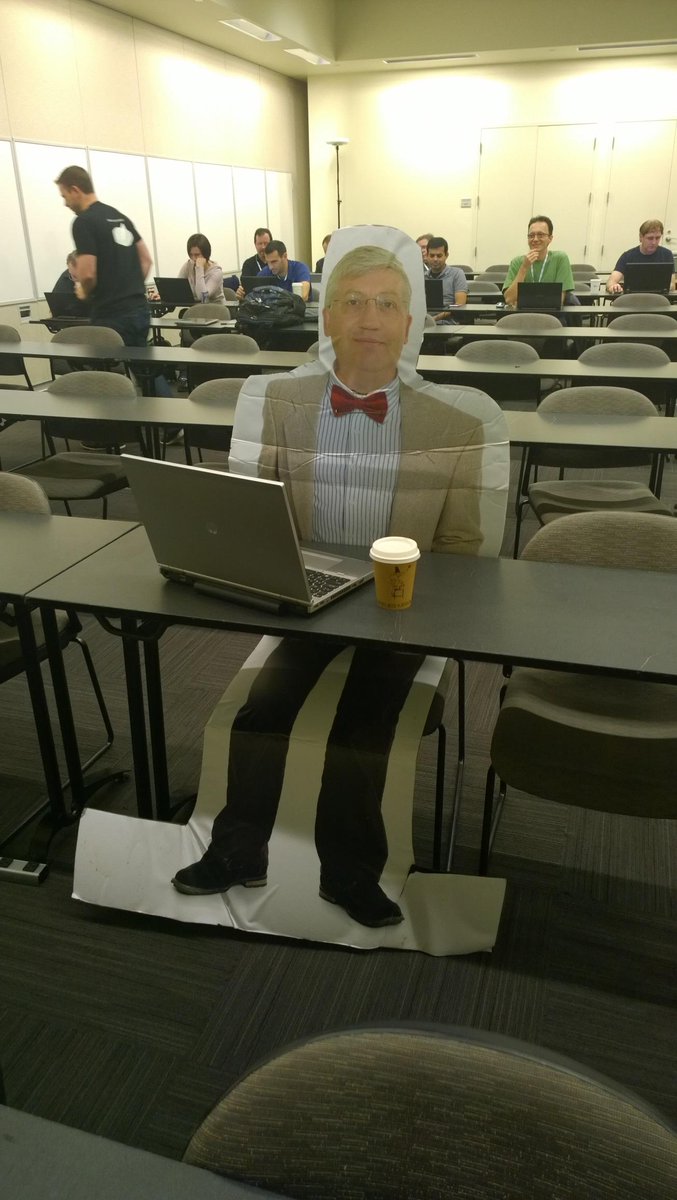
I’m at the annual MVP Summit this week, and everything we hear and see is pretty much NDA (except for pictures of Flat Tony). However, we just had a really interesting discussion that I think is safe to abstract here.

A couple years ago I wrote a post about what it means to be supported or unsupported. What I wrote then still stands: when Microsoft says something is unsupported, there can be multiple reasons for that label, and you do whatever-it-is at your own risk.

Microsoft’s support policy for Exchange 2013 can be summed up as “N-1”: when they release a new cumulative update (CU) or service pack, that version and the previous version are considered to be supported. So, in the fullness of time, when we get Exchange 2013 CU7, then CU6 and CU7 will be the officially supported versions.

It’s very clear that there’s a lot…

View original post 168 more words

Posted in Uncategorized | Leave a comment

Come join the Exchange 2013 information sharing Facebook Group!

This group, https://www.facebook.com/groups/MSEX2013/, was created over two years ago and has grown to over 4,000 members and over 1,000 post, a year ago it had just over 600 members! The focus of this group is to share information about Exchange 2013, with a bit of leeway given for Exchange 2010 and Office 365 related items.

So what does “information sharing” mean? This mainly includes people sharing blog posts they’ve created, or ones they have come across that they feel are worth sharing. It also includes some basic architecture and functionality questions and discussions. What it DOES NOT include is support or help on issues. Facebook is a poor platform for providing support, in addition on the Microsoft TechNet forums people, like my fellow MVPs get credit for answering questions. These credits help them keep their Microsoft MVP status. So for support type questions goto the Microsoft TechNet forums on Exchange. Therefore, support questions\posts in most cases are deleted, as are any off topic or posts with little to no value. We, the admins of this groups, work hard to keep out the spammers and keep the noise to a minimum. Since this group is very focused there are normally less than a few posts per day in this group.

As you will see the most common poster and fellow group admin (Exchange blogger, writer, etc) is Tony Redmond, who runs two different blogs. Many other Microsoft Exchange MVPs and non-MVPs post links to their articles here also. So if you are looking for some of the latest blog posts and topics on Exchange 2013 check out this Facebook group. If you are a content creators and want to share your Exchange 2013 related content come join the group and feel free to post to it!

Disclaimer: This is an unofficial Microsoft Exchange group. This group is managed by independent Exchange experts. It is NOT an official group by Microsoft and is managed by individuals in their personal time. It is not supported, managed, or moderated by Microsoft in any official capacity. For official support please use TechNet forums or contact Microsoft PSS (Open a tickets from the web).

In the near future we will be activating another Facebook group that will focus on Exchange vNext (version after 2013) and Office 365. Almost all info on vNext is currently under NDA, so nothing to share about it yet. Once this info starts to become public we will then make this other group visible and share it in the current group.

Posted in Exchange, Facebook | Tagged , | Leave a comment

Exchange 2013 CU6, 2010 SP3 RU7, & 2007 SP3 RU14 released & Known Issues

12/9/14 Update: 2013 CU7, 2010 SP3 UR8, & 2007 SP3 UR14 have been release:
https://blog.jasonsherry.net/2014/12/09/exchange-2013-cu7-2010-sp3-ur8-2007-sp3-ur15-released/

9/16/14 Update: Chrome 37 issue added
9/2/14 Update: More known issues added
8/31/14 Update: Do NOT install 2013 CU6, when co-existing with Exchange 2007, until you have this hotifx: KB2997209 or if you have or want to setup a hybrid relationship with O365 until you have KB2997355. See known issues for more details.
8/29/14 Update:  Known Issues added below. Microsoft released new updates packages for Exchange 2013 CU6 (2961810), 2010 SP3 RU7 (2961522), & 2007 SP3 RU14 (2936861) today. For full details see the Exchange Team’s EHLO post: http://blogs.technet.com/b/exchange/archive/2014/08/26/released-cumulative-update-6-for-exchange-server-2013.aspx

2013 CU6                   Download | KB2961810 | EHLO Post
2010 SP3 RU7            Download | KB2961522 | EHLO Post
2007 SP3 RU14          Download | KB2936861 | EHLO Post

Like all CUs for 2013 this one is also a full version of Exchange that can be installed as a 1st time install or will upgrading an existing install of 2013. Key updates in 2013 CU6 are the increase of Public Folder scalability to 100,000 folders, more info here, and a fix for the issue with the Hybrid Configure Wizard (HCW) failing on 1st run or when attempting to modify the settings, see KB2988229 for more info on the HCW issue. Like many of the CUs, CU6 also updates the AD schema. For more info on 2013 CU6 see Tony Redmond’s post here: http://windowsitpro.com/blog/exchange-2013-cumulative-update-6 Like all CU/RUs these contain the recent fixed and security updates, in additional all three contains the latest DST updates. I will add a known issues section to this post when I come run into or hear about issues with these updates.

2013 CU6 Known Issues:

Posted in Exchange | Tagged , , | 6 Comments

Exchange 2013 POP3 service drops connections fix

At my current client they are using POP3 and we are in the process of setting up Exchange 2013 servers to act as hybrid servers for their Office 365 migration.

So after setting up the servers I tested all protocols, then a day or so later I noticed that POP3 was showing down on the Kemp NLB. When I did TELNET test to port 110, from a remote machine, using the FQDN or IP the connection was dropped after a few moments, without returning any text.

I then tried from the Exchange server [2013 CU5, multi-role, 2 NICs (iSCSI and Pubic), POP bindings 0.0.0.0] itself and had the same results. I then tried 127.0.0.1 and localhost with TELNET and those worked. So the service was working, but not as expected.

I tried rebooting and resetting several settings on the PopSettings and searching for this issue on-line, but came up empty. So finally went to the TechNet Exchange Server 2013 – Outlook, OWA, POP, and IMAP Clients forum and searched on “pop connection” and found this post: POP works via localhost but not from other networked machines, which included the “fix.”

The issue was that the “State” of the PopProxy component was set to Inactive:

[PS] D:\>Get-ServerComponentstate -Identity SRVDENEX01

Server Component State
—— ——— —–
SRVDENEX01.company.com ServerWideOffline Active
SRVDENEX01.company.com HubTransport Active
SRVDENEX01.company.com FrontendTransport Active
SRVDENEX01.company.com Monitoring Active
SRVDENEX01.company.com RecoveryActionsEnabled Active
SRVDENEX01.company.com AutoDiscoverProxy Active
SRVDENEX01.company.com ActiveSyncProxy Active
SRVDENEX01.company.com EcpProxy Active
SRVDENEX01.company.com EwsProxy Active
SRVDENEX01.company.com ImapProxy Active
SRVDENEX01.company.com OabProxy Active
SRVDENEX01.company.com OwaProxy Active
SRVDENEX01.company.com PopProxy Inactive
SRVDENEX01.company.com PushNotificationsProxy Active
SRVDENEX01.company.com RpsProxy Active
SRVDENEX01.company.com RwsProxy Active
SRVDENEX01.company.com RpcProxy Active
SRVDENEX01.company.com UMCallRouter Active
SRVDENEX01.company.com XropProxy Active
SRVDENEX01.company.com HttpProxyAvailabilityGroup Active
SRVDENEX01.company.com ForwardSyncDaemon Active
SRVDENEX01.company.com ProvisioningRps Active
SRVDENEX01.company.com MapiProxy Active
SRVDENEX01.company.com EdgeTransport Active
SRVDENEX01.company.com HighAvailability Active
SRVDENEX01.company.com SharedCache Active

A quick call to Set-ServerComponentState to mark this component Active fixed the issue:

Set-ServerComponentState -Identity SRVDENEX01 -Component PopProxy -Requester HealthAPI -State Active

After doing this POP started responding as expected, using any valid hostname or IP address.

Like the user who posted to TechNet, I would also like to know why the health check failed and marked the PopProxy as inactive. I will research this further and if I find anything I will update this post.

Posted in Exchange, Microsoft, Technical | Tagged | 57 Comments

Script: Set-UPN-O365-PSMTP.ps1 – Sets UPNs on-premises and in Office 365

11/4/15: Posted script to TechNet Script Gallery: https://gallery.technet.microsoft.com/This-script-will-set-the-590a0907. Also updated code below and renamed the script to “Set-UPN-O365-PSMTP.ps1”

I’m working with a client who is migrating to Office 365 and we ran into the issue where users’ UPNs do not match their primary SMTP address, nor was it included as an SMTP address on their mailboxes.  In older, and maybe some current versions, of Android & iPhone devices if the user’s UPN didn’t match their primary SMTP address Autodiscover would fail. The user would then be prompted to put in the server name and login info.

With Office 365 the users must login with their UPN (be default), so its extra important that their UPN is their e-mail address. For my current client this was the issue we had to solve before we migrated to O365, once we migrate the users would need to login with their UPN. But their UPN was <samaccountname>@company.com and their Email Address Policy (EAP) in Exchange did not include this. Therefore, it would be confusing to users to tell them to login with their current UPN. In addition, since DirSync was setup months ago their UPN was already set in Office 365. With DirSync setup and a Hybrid configuration UPN updates made on-premises are not replicated to Azure AD (Office 365 AD). So I created the script below to take the PrimarySMTPAddress of a mailbox and set it as the UPN on-premises and in the cloud. I also worked my client to start using a create user script, like the one I posted here: https://blog.jasonsherry.net/2013/07/08/create-mailbox/.

  • This script was recently created, and with all of my scripts posted to my the blog code may not be updated, but they are updated on on my scripts website (http://izzy.org/Scripts).
  • If you find bugs or have questions comment below

Usage: ./Set-UPN-O365-PSMTP.ps1 <filter> [<SearchBase>]

  • Where <Filter>, required, can be any filter supported by the Get-AdUser cmdlet, see this article for examples.
  • Where [<SearchBase>], optional, can be the path to an OU to limit the results of the search
  • Example: ./Set-UPN-O365-PSMTP.ps1 * -SearchBase “OU=US,DC=Company,DC=Com”
    • This would return all users under the US OU

 Required Changes

  1. Install MS Online Services Sign-In Assistant -> http://www.microsoft.com/en-us/download/details.aspx?id=41950
  2. Install Windows Azure PowerShell  -> http://go.microsoft.com/fwlink/p/?linkid=236297
  3. $LocalDomain = “COMPANY”
    • Used to display the domain being updated
    • I might eliminate this in a future version by getting this attribute from the AD
  4. $UPNSuffix = “company.com”
    • Used to fill in the default login to O365
  5. $MakeChanges = $False
    • If set to the default of $False changes will only be logged to the screen and Set-UPN-O365.log file
  6. $UpdateO365 = $True
    • If set to $False changes will not be made to Office 365, just logged. $MakeChanges must also be set to $True for changes to be made to O365.

# WARNING: FOR EXAMPLE, NON-PRODUCTION USE 
# For more details see http://izzy.org/scripts/Warning.htm
#
# This script will set the on-premises UPN and Office 365 UPN value for a user
# to their PrimarySMTPAddress. DirSync/Azsure AD Sync will not sync UPN changes
# from on-premises to Office 365. So this script connects to O365 to make the 
# change directly.
#
# Source: http://izzy.org/scripts/O365/Set-UPN-O365-PSMTP.ps1
# Created 7/11/2014 | Last Updated 8/18/2015
#	8/22/14: Added checking for SamAccountName@UPNSuffix for O365 account, added more error handling, and more logging info
# 8/18/15: Renamed from Set-UPN-O365 to Set-UPN-O365-PSMTP.ps1
#
# Usage: .\Set-UPN-O365-PSMTP.ps1 <Filter> [<SearchBase>]
# Where: <Filter> is the filter to be used with the Get-ADUser command
#				 <SearchBase> is the optional OU to run the script against
#				 <SearchScope> controls the search level, defaults to [Subtree]
# Examples:	.\Set-UPN-O365-PSMTP.ps1 * -SearchBase "CN=Users,DC=Company,DC=Com"
#						.\Set-UPN-O365-PSMTP.ps1 * -SearchBase "OU=Sales,DC=Company,DC=Com"
#

param(
	[Parameter(Mandatory = $true)]
	[String]$Filter,
	[String]$SearchBase,
	[String]$SearchScope
)

$LocalDomain = "COMPANY"
$UPNSuffix = "company.com"

# Requires MS Online Services Sign-In Assistant -> http://www.microsoft.com/en-us/download/details.aspx?id=41950
# Requires above, Windows Azure PowerShell required to update Office 365 -> http://go.microsoft.com/fwlink/p/?linkid=236297
# For Filter examples see: http://blogs.msdn.com/b/adpowershell/archive/2009/04/14/active-directory-powershell-advanced-filter-part-ii.aspx

$MakeChanges = $False
$UpdateO365 = $True
$LogFile = "Set-UPN-O365-PSMTP.log"

If (!$MakeChanges) {Write-Host "MakeChange is set to False, changes will not be saved" -ForegroundColor Yellow}
If (!$UpdateO365) {Write-Host "UpdateO365 is set to False, changes will not be saved to Office 365" -ForegroundColor Yellow}

Import-module ActiveDirectory
If ($UpdateO365) {
	Import-Module MSOnline
	If (!$Global:O365Credentials) {
		write-output "Enter credentials for an org admin account in Office 365."
		$Global:O365Credentials = $host.ui.PromptForCredential("Need Office 365 credentials", "Please enter your user name and password.", "$env:username@$UPNSuffix", "UPN")}
	connect-msolservice -credential $Global:O365Credentials
}

If (!$SearchBase) {$SearchBase = $(Get-ADDomain).DistinguishedName}
If (!$SearchScope) {$SearchScope = "Subtree"}

Write-Host "Getting users under [$SearchBase] with a Filter of [$Filter]`n" -ForegroundColor Green
$Users = Get-ADUser -SearchScope $SearchScope -SearchBase "$SearchBase" -Filter $Filter -Properties mail
#$Users = Get-ADUser -SearchScope $SearchScope -SearchBase "$SearchBase" -Filter {sAMAccountName -eq "DChoudhu"} -Properties mail

"Local account: $env:username,Office 365 Account: $($Global:O365Credentials.UserName),Started: $(Get-Date -f "MM/dd/yyyy HH:mm:ss"),Information" | Out-File -Append $LogFile
"Filter: $Filter, SearchScope: $SearchScope, SearchBase: $SearchBase, Information" | Out-File -Append $LogFile

$Users | ForEach {
	$ADUser = $_
	If ($($ADUser.Mail)) {
		$PrimarySmtpAddress = $ADUser.Mail
		$SamAccountName = $ADUser.SamAccountName
		$CurrentUPN = $ADUser.UserPrincipalName
		Write-Host "Updating: $LocalDomain\$SamAccountName | Local UPN: [$CurrentUPN]" -ForegroundColor Cyan
		$ErrorInfo = ""
		$Updated = $False
		
		If ($ADUser.UserPrincipalName -ne $PrimarySmtpAddress) {
			Write-Host "  Local UPN: $CurrentUPN | New UPN: $PrimarySmtpAddress" -ForegroundColor Cyan
#			"$SamAccountName, $PrimarySmtpAddress, $CurrentUPN, Information, Local user updated" | Out-File $LogFile -Append
			If ($MakeChanges) {Set-ADUser $ADUser.DistinguishedName -UserPrincipalName $PrimarySmtpAddress}
			$Updated = $True
		}
		Else {Write-Host "  Local UPN already matches"  -ForegroundColor Green}
		If ($UpdateO365) {
			
			$O365User = $Null
			$LegacyUPN = "$($SamAccountName)@$($UPNSuffix)"
			$error.clear()
			$O365UPN = $CurrentUPN
			Try {$O365User = Get-MsolUser -UserPrincipalName $CurrentUPN -ErrorAction Stop}
			Catch {
				If ($_.Exception.Message -like "*User Not Found*") {
					$ErrorInfo = "O365 user not found UPN: [$CurrentUPN]"
					"$SamAccountName, $PrimarySmtpAddress, $CurrentUPN, Error, O365 user not found current UPN" | Out-File $LogFile -Append
					Write-Host "    User with UPN of [$CurrentUPN] was not found.`n    Searching using legacy UPN format: [$LegacyUPN]." -ForegroundColor Yellow
				}
				Else {
					write-error $("TRAPPED: " + $_.Exception.GetType().FullName)
					write-error $("TRAPPED: " + $_.Exception.Message)
				}
			}
			$error.clear()
			If (!$O365User) {
				$O365UPN = $LegacyUPN
				Try {$O365User = Get-MsolUser -UserPrincipalName $LegacyUPN -ErrorAction Stop}
				Catch {
					If ($_.Exception.Message -like "*User Not Found*") {
						$ErrorInfo = "O365 user not found Legacy UPN"
						"$SamAccountName, $PrimarySmtpAddress, $LegacyUPN, Error, $ErrorInfo" | Out-File $LogFile -Append
						Write-Host "    User with UPN of [$LegacyUPN] was not found and will not be updated." -ForegroundColor Red
					}
					Else {
						write-error $("TRAPPED: " + $_.Exception.GetType().FullName)
						write-error $("TRAPPED: " + $_.Exception.Message)				
					}
				}
			}
			If ($O365User) {
				$ErrorInfo = ""
				If ($O365User.UserPrincipalName -ne $PrimarySmtpAddress) {
					Write-Host "  O365 UPN: $O365UPN | New UPN: $PrimarySmtpAddress" -ForegroundColor Cyan
					$Updated = $True
					$error.clear()
					Try { If ($MakeChanges) {Set-MsolUserPrincipalName -UserPrincipalName $O365UPN -NewUserPrincipalName $PrimarySmtpAddress -ErrorAction Stop}}
					Catch {
						$Updated = $False
						write-error $("TRAPPED: " + $_.Exception.GetType().FullName)
						write-error $("TRAPPED: " + $_.Exception.Message)
						"$SamAccountName, $PrimarySmtpAddress, $CurrentUPN, Error, Type: $($_.Exception.GetType().FullName)" | Out-File $LogFile -Append
					}
				}
				Else {Write-Host "  Office 365 UPN already matches"  -ForegroundColor Green}
				
			}
		} # If ($UpdateO365)
		If (!$ErrorInfo) {If ($Updated) {$ErrorInfo = "Updated"}Else {$ErrorInfo = "Already matched"}}
		"$SamAccountName, $PrimarySmtpAddress, $CurrentUPN, Information, $ErrorInfo" | Out-File $LogFile -Append
	} # IF Mail
} #ForEach
Posted in Exchange, Microsoft, Script, Technical | Tagged , , | 1 Comment

Windows Update KB2881011 breaks Outlook 2013 access to archived mailboxes

8/21/14 Update: Microsoft released KB2889859 which fixed this issue for Outlook 2013. Click-to-run has also been updated to 15.0.4641.1003.

8/14/14 Update: KB2881011 has been pulled, but the Click-to-run (Office 365 version of Outlook) update has NOT been pulled and is still affected as of 8/14.

Notice

An issue has been discovered in the August 12, 2014, update for Microsoft Outlook 2013 that prevents some users from opening archive folders. We have removed this update from availability until we have a fix. In the interim, you can restore access to archived folders by uninstalling this update. We will add a download link to this article for the new update as soon as it is available.

Original post: (With updates being made as needed)
This update causes Outlook 2013 to fail to open archive mailboxes on Exchange, maybe only on Exchange 2013 CU5 but probably on SP1/CU4 too I would suspect.

When a user, with this update, tries to access their archive mailbox they will get the following error:

The set of folders cannot be opened. Microsoft Exchange is not available. Either there are network problems or the Exchange server is down for maintenance.

This update KB2881011 was just released via Windows Update on 8/12/2014, it updates Outlook to 15.0.4641.1001. The issue also occurs in the latest Office 365 Click-to-run version 15.0.4641.1002. After removing this update access will work again.

This is another example of why you should test patches and deploy them to a pilot set of users, using something like WSUS, before deploying them to all users. Want another example, MS14-045 aka KB2984615 can cause BSOD per this article: http://nakedsecurity.sophos.com/2014/08/18/microsoft-pulls-patch-tuesday-kernel-update-ms14-045-can-cause-blue-screen-of-death.

Confirmed Affected

  • Outlook x64 w/ KB28810011 (15.0.4641.1001) w/ mailboxes on Exchange 2013 SP1 CU5
  • Outlook x64 w/ KB28810011 (15.0.4641.1001) w/ mailboxes on Exchange Online (Office 365)
  • Outlook x64 Click-to-run version 15.0.4641.1002 w/ mailboxes on Exchange 2013 SP1 CU5
  • In both case Outlook was connected via Outlook Anywhere (RPC/MAPI over HTTPS), not via MAPI over HTTP.

Confirmed NOT affected

  • Outlook x64 Click-to-run version 15.0.4641.1002 w/ mailboxes on Exchange 2010 SP3 UR6
  • Outlook x86 (32-bit) w/ mailboxes on Exchange Online (Office 365)
    • This indicates it might just be an issue with the x64 version of the update

More details on Tony Redmond’s post here: http://windowsitpro.com/blog/update-causes-outlook-2013-fail-open-archive-mailboxes

This issue 1st was posted on the Exchange 2013 Facebook group I manage here: https://www.facebook.com/groups/MSEX2013/permalink/874603922568726/ and in the TechNet forums by Jim Collins.

  • Note: The Facebook group should NOT be used for support, it is an information sharing group. Normally all support questions are referred to TechNet then deleted from the group.
Posted in Exchange, Technical | Tagged , | 6 Comments

Exchange 2013 OWA -> 2010 : “something went wrong” issue

Ran into this issue after setting up and configuring two new Exchange 2013 CU5 servers when 2010 SP3 RU6 based mailbox users attempting to login into OWA via Exchange 20130 OWA.

This is probably one of the most useless messages in Exchange, yeah there were many bad ones in earlier versions I know, but really disappointed Microsoft couldn’t provide a bit more troubleshooting information than this partial sentence.  Nothing in event or IIS logs, which I found at least either.

Here’s the whole message you get in OWA 2013 when you run into the problem I did:

EX2013-OWA Error

Users, only test users at this phase of the deployment luckily, who are on Exchange 2010 would get this error when they went to the testing URL (mail2.company.com/owa) for Exchange 2013 OWA access.  After they logged into they would get this error, but the browser would continue to act like it was loading the page.

IIS logs on 2013 didn’t contain any errors:
2014-08-12 18:14:59 10.10.69.220 POST /owa/auth.owa &CorrelationID=<empty>;&cafeReqId=<cut>; 443 zEX20.Test@ company.com 10.10.55.6 Mozilla/5.0+(compatible;+MSIE+10.0;+Windows+NT+6.2;+WOW64;+Trident/6.0) https://mail2.company.com/owa/auth/logon.aspx?replaceCurrent=1&url=https%3a%2f%2fmail2.company.com%2fowa%2f 302 0 0 343

Nor did the HttpProxy logs:
2014-08-12T19:14:37.044Z,e4ab9b1b-9483-4f82-9d0b-e91f2e7b1ecf,15,0,913,7,,Owa,mail2.company.com,/owa/auth.owa,,FBA,True,COMPANY\ex20test,,Sid~S-1-5-21-<cut>,Mozilla/5.0 (Windows NT 6.3; WOW64; Trident/7.0; rv:11.0) like Gecko,10.10.69.7,DCOCEXC220,302,,,POST,,,,,WindowsIdentity,,DCOCEXC020,388,164,,,,72,1003,,0,229;,229,90;48;9;,147,376,,0,1109.4356,4,,,,,,,,,28,1032,0,,1036,,1108,1108,,,BeginRequest=2014-08-12T19:14:35.935Z;CorrelationID=<empty>;ProxyState-Run=None;ServerLocatorCall=c03fc9f8-0322-4166-ba65-e51ddbaa4c24;DownLevelTargetHash=0/0/2;ClientAccessServer=DCOCEXC011.company.com;ResolveCasLatency=31;ProxyState-Complete=CalculateBackEnd;EndRequest=2014-08-12T19:14:37.044Z;I32:ADS.C[DCOCADC007N]=1;F:ADS.AL[DCOCADC007N]=0.9467;I32:ATE.C[DCOCADC006N.company.com]=9;F:ATE.AL[DCOCADC006N.company.com]=1.666667;I32:ATE.C[DCOCADC007N.company.com]=1;F:ATE.AL[DCOCADC007N.company.com]=93;I32:ADS.C[DCOCADC006N]=7;F:ADS.AL[DCOCADC006N]=3.064757;I32:ADR.C[DCOCADC006N]=3;F:ADR.AL[DCOCADC006N]=1.140667,

After trying many things, links to a couple at the end, I got it working after enabling Windows Authentication in IIS on the OWA & ECP virtual directories on the Exchange 2010 CAS servers.  I should have checked that 1st! After making this change you will also need to recycle the MSExchangeOWAAppPool & MSExchangeECPAppPool Application Pools to make it take effect immediately.

This left Basic & Windows Authentication enabled on the OWA & ECP VDs on 2010 in IIS and just basic on Exchange 2013.

Output from Get-OWA\ECPVirtualDirectory after fixing the issue:

Get-OwaVirtualDirectory | fl name, server, *auth*

Name                          : owa (Default Web Site)
Server                        : DCOCEXC011 (2010 server)
ClientAuthCleanupLevel        : High
InternalAuthenticationMethods : {Basic, Fba}
BasicAuthentication           : True
WindowsAuthentication         : True
DigestAuthentication          : False
FormsAuthentication           : True
LiveIdAuthentication          : False
ExternalAuthenticationMethods : {Fba}

Name                          : owa (Default Web Site)
Server                        : DCOCEXC220 (2013 server)
ClientAuthCleanupLevel        : High
InternalAuthenticationMethods : {Basic, Fba}
BasicAuthentication           : True
WindowsAuthentication         : False
DigestAuthentication          : False
FormsAuthentication           : True
LiveIdAuthentication          : False
AdfsAuthentication            : False
OAuthAuthentication           : False
ExternalAuthenticationMethods : {Fba}

Get-EcpVirtualDirectory | fl name, server, *auth*

Name                          : ecp (Default Web Site)
Server                        : DCOCEXC011 (2010 server)
InternalAuthenticationMethods : {Basic, Fba}
BasicAuthentication           : True
WindowsAuthentication         : True
DigestAuthentication          : False
FormsAuthentication           : True
LiveIdAuthentication          : False
ExternalAuthenticationMethods : {Fba}

Name                          : ecp (Default Web Site)
Server                        : DCOCEXC220 (2013 server)
InternalAuthenticationMethods : {Basic, Fba}
BasicAuthentication           : True
WindowsAuthentication         : False
DigestAuthentication          : False
FormsAuthentication           : True
LiveIdAuthentication          : False
AdfsAuthentication            : False
OAuthAuthentication           : False
ExternalAuthenticationMethods : {Fba}

Related issues, but did not the solution for my issue:
http://ril3y.wordpress.com/2014/03/25/exchange-2013-owa-and-ecp-logins-fail-with-500-error/
https://support.microsoft.com/kb/2898571

Posted in Exchange, Technical | Tagged | 11 Comments

How to edit your contact info in OWA

I’ve had a couple of users, in the environment I host for friends & family, ask me how to change their contact info in the GAL. After doing some searching I was unable to find a good article on this topic, which surprised me. I’m sure after posting this I will get comments to ones I didn’t find, but in searching on “edit contact info in owa exchange” and several other variants of this I didn’t find a blog post or article on this, at least on the first two pages of hits.

By default in Exchange 2010 and higher users have the ability to edit their contact. This can be disabled, I did find a good article by Michel de Rooij on this topic: http://eightwone.com/2011/03/31/disabling-editing-account-information-in-owa/.

The easiest solution is to tell users to goto https://mail.company.com/ecp/PersonalSettings/EditAccount.aspx and once they login to OWA they will be taken to the edit contact info page in Exchange 2010 or 2013.

To get to this page from OWA and its menus is pretty easy, if you don’t know where to look. Of course if you know the URL, which I didn’t since I rarely use OWA, or don’t do end user support, you could setup a http://company.com/EditMyInfo URL to redirect to the correct URL.

For Exchange 2010

1)      Login into OWA
2)      In the upper right, under your name, choose Options\See All Options…EX12-See-All

3)      Then click Edit to the lower right of the “Account Information…” area, which will show your name, e-mail, contact numbers
4)      Click Contact Location to change your address
5)      Then click Save

For Exchange 2013

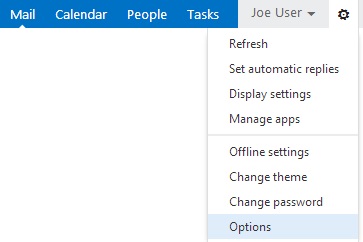
1)      In OWA, in the upper right hand corner click the little gear and choose Options
EX14-Options
2)      On the options\account page in the middle at the bottom click Edit information

Posted in Exchange, Technical | Tagged | Leave a comment

Exchange 2010 SP3 UR6 and 2013 CU5 released

Here’s a quick summary of fixed and known issues.

Last updated 8/14/2014

Exchange 2010 SP3 UR6 – Download | KB2936871 Info
Exchange 2013 CU5 – EHLO Blog Post | Download | KB2936880 (CU5 includes SP1 updates)

Blog post about 2013 CU5 I recommend reading:

Exchange 2013 SP1 CU5 Known\Found issues

 
  • 8/15/14: Possible issue with ECP not working when Exchange is not installed in the default path
    • This is from one of my MVP peers: If you don’t install the updates, like IUs, that come as a .MSP files some files will not be updated correctly. This can lead to issues things like ECP
      • Example: The web.config file used by ECP is not updated correctly.
    • Workaround: Install the updates from a admin command prompt
  • 9/2: HIGH: OWA bug doesn’t preserve items under litigation and in-place holds
    • Covered briefly in KB2996477
    • Tony Redmond posted about this issue on 8/28 here: http://windowsitpro.com/blog/owa-bug-compromises-item-preservation-litigation-and-place-holds
    • The issue, where a delegated user can delete items that are under litigation hold, seems to have existed since 2013 RTM and still exist in CU6 and Exchange Online as of 9/2/14.
    • Workarounds:
      1. Remove delegated access to mailbox under litigation hold
      2. Disable OWA access to mailbox under litigation hold
      3. Put all users who have been delegated access on litigation hold also

Exchange 2010 SP3 UR6 fixes (from http://support.microsoft.com/kb/2936871)

  • 2960652 Organizer name and meeting status field can be changed by EAS clients in an Exchange Server 2010 environment
  • 2957762 “A folder with same name already exists” error when you rename an Outlook folder in an Exchange Server 2010 environment
  • 2952799 Event ID 2084 occurs and Exchange server loses connection to the domain controllers in an Exchange Server 2010 environment
  • 2934091 Event ID 1000 and 7031 when users cannot connect to mailboxes in an Exchange Server 2010 environment
  • 2932402 Cannot move a mailbox after you install Exchange Server 2010 SP3 RU3 (KB2891587)
  • 2931842 EWS cannot identify the attachment in an Exchange Server 2010 environment
  • 2928703 Retention policy is applied unexpectedly to a folder when Outlook rule moves a copy in Exchange Server 2010
  • 2927265 Get-Message cmdlet does not respect the defined write scope in Exchange Server 2010
  • 2925273 Folder views are not updated when you arrange by categories in Outlook after you apply Exchange Server 2010 Service Pack 3 Update Rollup 3 or Update Rollup 4
  • 2924592 Exchange RPC Client Access service freezes when you open an attached file in Outlook Online mode in Exchange Server 2010
  • 2923865 Cannot connect to Exchange Server 2010 when the RPC Client Access service crashes

Exchange 2013 CU5 fixes (from http://support.microsoft.com/kb/2936880)

  • 2963590 Message routing latency if IPv6 is enabled in Exchange Server 2013
  • 2963566 Outlook Web App accessibility improvement for UI appearance in Exchange Server 2013
  • 2962439 You cannot sync contacts or tasks in Microsoft CRM client for Outlook in an Exchange Server 2013 environment
  • 2962435 CRM synchronization fails if the time zone name of a meeting is not set in an Exchange Server 2013 environment
  • 2962434 Slow performance in Outlook Web App when Lync is integrated with Exchange Server 2013
  • 2958430 “Some or all Identity references could not be translated” error when you manage DAG in Exchange Server 2013 SP1 in a disjoint namespace domain
  • 2957592 MIME is disabled in Outlook Web App when you press Tab to move the focus in an email message in Exchange Server 2013
  • 2942609 Exchange ActiveSync proxy does not work from Exchange Server 2013 to Exchange Server 2007
  • 2941221 EWS integration for Lync works incorrectly in an Exchange Server 2013 and 2007 coexistence environment
  • 2926742 Plain-text message body is cleared when writing in Outlook Web App by using Internet Explorer 8 in Exchange Server 2013
  • 2926308 Sender’s email address is broken after importing a PST file into an Exchange Server 2013 mailbox
  • 2925559 Users always get the FBA page when they access OWA or ECP in Exchange Server 2013
  • 2924519 “SyncHealth\Hub” folder is created unexpectedly after installing Cumulative Update 2 for Exchange Server 2013
  • 2916113 Cannot open .tif files from email messages by using Windows-based applications in an Exchange Server 2013 environment
  • 2592398 Email messages in the Sent Items folder have the same PR_INTERNET_MESSAGE_ID property in an Exchange Server 2010 environment
Posted in Exchange, Microsoft, Technical | Tagged , | 2 Comments