
Just before MEC I got an request for a Q&A session with Adnan Rafique [GITCA Global Director-at-Large] about Exchange, MEC, and myself. If you are interested in knowing my thoughts on these topics goto the post below:
Another iPhone/iPad iOS6.0 issue with Exchange
Update 2/7/13: iOS 6.1 is out now, not sure which of the issues below are fixed by it BUT 6.1 has an issue with excessive log generation and meeting request duplicatication. I haven’t seen this firsthand, but I have seen people on the forums having this issue and so have my peers.
Blog post on current iOS 6.1 issue: https://blog.jasonsherry.net/2013/02/10/ios-6-1-causing-very-high-log-generation-on-exchange/
Update 11/1/12: iOS 6.0.1 released http://support.apple.com/kb/DL1606
Not much details out yet, but it does state “Fixes a bug affecting Exchange meetings.” A bit more details on mashable: http://mashable.com/2012/11/01/apple-ios-6-0-1-update/. Per Steve Goodman (http://www.stevieg.org/2012/11/ios-6-0-1-update-available-including-exchange-meetings-bug-fix/) post the Autodiscover issue still exist in 6.0.1.
Update 10/23/12:
Added link to EHLO Blog Post: iOS6 devices erroneously take ownership of meetings
Update 10/22/12:
Microsoft now has updated KBs on some of these issues:
KB256324: Current issues with Microsoft Exchange ActiveSync and third-party devices
KB2768774: Meeting in Attendee’s Calendar Loses Track of the Meeting Organizer. This KB also list several fixes included in iOS6.
See this related 10/23 EHLO Blog Post: iOS6 devices erroneously take ownership of meetings on this issue.
So as of 10/22 there are three publicly known and documented issues with iOS6 and Exchange. I know of several others from the internal and NDA threads I’m on but can’t share them yet. Microsoft and the Exchange community is STRONGLY suggest you contact Apple with any issues you have. Again, these are iOS issues not Microsoft Exchange issues.
Attendee becomes meeting organizer – Added 10/23
From KB2768744:
If an attendee takes action on a meeting item using an Apple iOS 6 device, synchronizing with Microsoft Exchange Server using Exchange ActiveSync (EAS), the meeting organizer may be changed and replaced by the attendee.
Workaround:
- Recommend that users do not take any action on Calendar items, to include Meeting Requests and Responses in the Inbox, using their iOS device.
- Recommend that users not update to iOS 6 at this time.
- Block iOS 6 using the Exchange Server 2010 Allow/Block/Quarantine feature. See the following post on the MS Exchange Team Blog:
http://blogs.technet.com/b/exchange/archive/2010/11/15/3411539.aspx- Block iOS devices for earlier versions of Exchange Server using the following documentation:
http://blogs.technet.com/b/exchange/archive/2008/09/05/3406212.aspx- Block anyone who has, or is, a delegate from using EAS.
- Recommend a different client, such as Outlook Web Access or a third-party e-mail synchronization solution.
- Recommend the use of POP/IMAP for e-mail synchronization on the device.
11/1: There is a history of this issue going back to iOS 4.3: Exchange/iOS “meeting hijack” history goes back well before iOS 6
10/23 EHLO Blog Post: iOS6 devices erroneously take ownership of meetings
Autodiscover not working:
11/1/12: This is not fixed in 6.0.1
Per several Exchange MVPs it seems that Autodiscover (the feature that will automatically configure you phone to connect to Exchange based on an e-mail address and password) doesn’t work in many cases with Exchange.
This has been verified by multiple people, see Clint Boessen’s blog post here: http://clintboessen.blogspot.com.au/2012/10/apple-iphone-ios6-and-exchange.html for a bit more details.
One person was able to get it to work, but only if the e-mail addresses entered on the iPhone matched the user’s UPN (User Principal Name aka e-mail like login).
Disappearing meetings
Added 10/23 and confirmed by Microsoft:
For some attendees or organizer:
From KB256224:
Issue 1.7 – Meetings are missing due on some mobile devices, but are present in OWA and Outlook
When you create a recurring Appointment or Meeting, then change a critical property in an occurrence in the series (for example date, time or location), and then change the whole meeting Series again, the item may not be updated on a device.The change is reflected correctly in Outlook, but meeting organizers or attendees do not see the change reflected on their devices. The result is an apparent “missing appointment” on the device user’s Calendar.
Cause
The devices use the Global Object Identifier (GOID) instead of the ServerID to track changes to the Calendar item for synchronization requests.When the meeting series is changed, the same GOID is retained on the whole series. When the device receives the Delete request, sent when the series is changed, in a separate sync request from the change to the individual occurrence, it considers the series change as a duplicate and does not process the update.
Solution
Microsoft believes this issue is resolved in iOS 6. For confirmation or further investigation of this issue, contact the device manufacturer.
Disappear for everyone: (Unconfirmed as of 10/23)
Original text from 10/16
Another issue with iOS6 is related to a bug where declining a meeting invite can cause the meeting to be canceled for everyone. See these post for more details
http://www.macrumors.com/2012/10/03/fortune-500-company-urging-employees-not-to-upgrade-to-ios-6-over-exchange-bug/
The issue appears when users decline a meeting invitation from an iOS 6 device. Instead of simply sending a notification to the meeting organizer that the user will not attend, iOS 6 is sending meeting cancellation notices to the entire distribution list, effectively canceling the invitation for all attendees.
Exchange 2013 goes GOLD!
Exchange 2013 went RTM\GOLD yesterday on 10/11/12 day 🙂
For the official announcement check out the EHLO blog post: http://blogs.technet.com/b/exchange/archive/2012/10/11/the-new-exchange-reaches-rtm.aspx
This blog post contains 15+ links to articles that the Exchange team has created over the last several months on Exchange 2013.
For my summary on what’s New & Cool in Exchange 2013 see my blog post here: https://blog.jasonsherry.net/2012/07/31/new_cool_exchange_2013/
Volume licensing customers should be able to download it in mid-November. In addition, Office, SharePoint, and Lync 2013 have also gone gold\RTM. See the Office team’s blog post on that here: http://blogs.office.com/b/office-news/archive/2012/10/11/office-reaches-rtm.aspx
But for those clients using Exchange 2010 you will need to wait until “the first half of calendar year 2013” since Exchange 2010 SP3 is required to co-exist with Exchange 2013 but SP3 won’t be released until then. #FAIL 😦 See this EHLO blog post on Exchange 2010 SP3: http://blogs.technet.com/b/exchange/archive/2012/09/25/announcing-exchange-2010-service-pack-3.aspx. Luckily I have access to the beta version of SP3 and will install it, upgrade to 2013, and then retire 2010 before SP3 goes gold\RTM.
My Microsoft Exchange Conference 2012 Sessions
This is a quick post, still in Orlando and leaving for Disney World Hollywood Land with the family in just a bit, but had multiple people contact me asking for the content for my sessions. So wanted to post them here for now, later I’ll do a full blog post for each session. I gave each of these session twice at MEC to a room full (standing room only) of 50+ people. All sessions should have their related content posted at some point at http://mecisback.com, until then you can download my content below.
The PPTs, and related Word Doc for the cross forest migration session, can be downloaded from this SkyDrive folder: http://sdrv.ms/RdpXrD
E14.304 Migrating from Another Forest to 2010 Without 3rd party tools
This session will cover the many steps required to migrate from one Exchange 2000 or higher forest to Exchange 2010 in another forest. A high-level outline of the steps, scripts, Microsoft tools, and notes from the fields will be discussed. Discussion will cover the scripts included with Exchange 2010 to migrate mailboxes across forest and how to migrate contacts, groups, policies, and many other settings that aren’t migrated by those scripts. The main focus will be the many additional steps, solutions, and scripts required to do a full fidelity migration. This session will not go into detail on Forefront Identity Manager and 3rd party solutions; however the use of them will be discussed. You should walk away from this session understanding the complexities of a cross forest migration and be able to make a much more educated decision if your organization should go with the “free” tools or one of the tools provided by 3rd parties.
E14.305 Personal Archive and Retention Policies
This session will cover personal archive and retention best practices and usage. Topics discussed will include enforcing policies across the entire mailbox and specific folders, using retention and archiving tags, Managed Folders vs. Retention Tags, and Migrating PSTs to Personal Archive mailboxes. 3rd party archiving solutions will be open for discussion, but will not be the primary focus of this session. You should leave this session with a better understanding and new knowledge of the personal archive and retention options in Exchange. This session will be highly interactive; please bring any related requirements and desires with you to be discussed.
PS: If you missed the #IamMEC buzz click here
Update rollup 4 for Exchange 2010 SP2 & RU 8 for 2007 SP3 release
Last week. 8/14/2012, Microsoft released both of these rollups. I waited a few days before installing them on my two servers and the install when fine. I always like to wait a few days and monitor the Exchange MVP & Exchange Team mailing list I’m on for any issues that come up.
Check out Tony Redmond’s blog post for some details on what is in this rollup: Analyzing Exchange 2010 SP2 RU4
Here’s the key updates that the Exchange Team called out on their blog post on RU4 for 2010 SP2:
- New updates for August DST – Exchange 2010 – SP2 RU4 – Display name for OWA.
- 2685001 Retention policies do not work for the Calendar and Tasks folders in an Exchange Server 2010 SP1 environment
- 2686540 Exchange 2010 Messages are not delivered to Journal Mailbox
- 2701162 Granting Full Mailbox Access Does Not Allow Full Details of Free/Busy To Be Displayed
- 2724188 Information loss due to unexpected subject modification while copying a message in Outlook
- 2743871 Stop Forefront services in RU setup so no manual steps are required
- 2740358: MS12-058: Vulnerability in Microsoft Exchange Server WebReady document viewing could allow remote code execution: August 14, 2012
Here’s what the Exchange team called out in their blog post on RU8 for 2007 SP3:
- New updates for August DST – Exchange 2007 – SP3 RU8
- 2701037 Store.exe crash by strcat_s() to Exchange 2007
- 2699574 Microsoft Exchange Information Store service may stop responding when you perform a search on Exchange mailboxes in an Exchange Server 2007 environment
- 2740358 MS12-058: Vulnerability in Microsoft Exchange Server WebReady document viewing could allow remote code execution: August 14, 2012
Speaking at MEC 2012!
12/10/13: Update: This session was also given by me at MEC 2014. See this post for updated content: https://blog.jasonsherry.net/2013/12/10/speaking-at-mec-2014-in-april-on-cross-forest-migrations/
9/28/12 Update: See my “My Microsoft Exchange Conferance 2012 Sessions” post for links to my content.
I will be hosting two sessions at MEC (Microsoft Exchange Conference) 2012 in Orlando, FL 9/24 – 9/26. For more info on MEC goto: http://www.mecisback.com/.
So come out to MEC and meet me and the many other Exchange MVP and Microsoft Exchange team members that will be there! All sessions will be small and highly interactive. This will be the best place to learn about Exchange 2013 and get any of your Exchange questions answered.
Here are the two sessions I will be hosting:
Personal Archive and Retention Policies [E14.305]
This session will cover personal archive and retention best practices and usage. Topics discussed will include enforcing policies across the entire mailbox and specific folders, using retention and archiving tags, Managed Folders vs. Retention Tags, and Migrating PSTs to Personal Archive mailboxes. 3rd party archiving solutions will be open for discussion, but will not be the primary focus of this session. You should leave this session with a better understanding and new knowledge of the personal archive and retention options in Exchange. This session will be highly interactive; please bring any related requirements and desires with you to be discussed.
Migrating from another forest to 2010 without 3rd party tools [E14.304]
This session will cover the many steps required to migrate from one Exchange 2000 or higher forest to Exchange 2010 in another forest. A high-level outline of the steps, scripts, Microsoft tools, and notes from the fields will be discussed. Discussion will cover the scripts included with Exchange 2010 to migrate mailboxes across forest and how to migrate contacts, groups, policies, and many other settings that aren’t migrated by those scripts. The main focus will be the many additional steps, solutions, and scripts required to do a full fidelity migration. This session will not go into detail on Forefront Identity Manager and 3rd party solutions; however the use of them will be discussed. You should walk away from this session understanding the complexities of a cross forest migration and be able to make a much more educated decision if your organization should go with the “free” tools or one of the tools provided by 3rd parties.
Here’s my related post when MEC was announced: https://blog.jasonsherry.net/2012/03/06/mec-is-back-in-2012/
Windows 8 / Windows Server 2012 Installfests and Boot 2 VHD Events
My friend Harold Wong from Microsoft is putting on Windows 8 & Windows Server 2012 “installfest” boot 2 VHD events in CO, CA, and AZ.
This Friday 8/10 from 1 PM – 4 PM is the event in Denver, CO. It is an informal event where Harold will help folks get the Windows 8 Release Preview and Windows Server 2012 Release Candidate installed and configured.
See his blog for more info: http://blogs.technet.com/b/haroldwong/archive/2012/08/06/windows-8-windows-server-2012-installfests-and-boot-2-vhd-events-taking-place-in-the-next-30-days.aspx
The direct registration for Denver is: http://hwdenverinstallfest1.eventbright.com.
What’s New and Cool in Exchange 2013
10/1/15: Exchange 2016 is out now! What’s New and Cool in Exchange 2016 post
2/12/13 Update: Exchange 2010 SP3 is out, which provides support for Exchange 2013 CU1. Read more here: https://blog.jasonsherry.net/2013/02/12/exchange-2010-sp3-is-out/
1/8/13 Update: What’s NOT cool in Exchange 2013: See this blog post: Exchange Server 2013 Gotchas by Michael B. Smith. I might do a similar one when I have time, for now I’ve given up on Exchange 2013 in my own environment due to spam filtering, transport, and
other issues. I’ll stay on 2010 until at least SP1/CU1 comes out for 2013.
4/2/13 Update: EHLO post: Released: Exchange Server 2013 RTM Cumulative Update 1
2/15/13 Update: EHLO post: Exchange 2013 Client Access Server Role
2/12/13 Update: Exchange 2010 SP3 is out, which adds co-existance support for Exchange 2013 RTM CU1
11/8 Update: EHLO post: Public folders in the new Office
10/2 Update: EHLO post: Managing High Availability with the EAC
8/23 Update: EHLO post: Site Mailboxes in the new Office
8/9 Update: EHLO post: Managing The New Exchange
Microsoft released the technical preview of Exchange 2013 on July 16th and this is my next in the “What’s New and Cool” series on Exchange. (Goto these links for the Exchange 2010 & 2007 posts) As I have time to work with the beta and additional information is made public, I may update this post and I will create new posts on Exchange 2013.
The main focus for Exchange 2013 is further reducing cost of deployment and management. The four main areas that were changed to meet this goal were roles/deployment, management, storage, and end user productivity. Unlike Exchange 2007 and 2010 there may not be any major must have features for your organization, so if you are currently on Exchange 2010 the upgrade to 2013 might be a bit hard to justify. However if you are on Exchange 2003 you MUST upgrade to 2010 SP3 before you can upgrade to 2013; so now is the time to look at upgrading. If you are still on 2007 the features in 2010, which are further enhanced in 2013, should be reason enough to upgrade.
Deployment Changes
For deployment Microsoft has radically changed from the five roles in Exchange 2007 and 2010 back to the two roles, like Exchange 5.x – 2003. Basically there is a very lightweight front-end role that combines part of the CA & HT role into one, but mainly only provides proxying services. What we used to call the CAS is now being called the CAFÉ (Client Access Front-End) by some. No rendering or other function that used to be carried out by the CAS are done on this server anymore. It also does part of what the HT role used to do, now being called FET (Front-End Transport) for short. The FET services handle basic filtering but mainly route messages to the backend server, or now simply called the Mailbox Server. So that now there are only two roles in Exchange 2013: Client Access Server and Mailbox Server. There were many changes made to support this re-design but the end result is greatly simplified deployments by using CAS and MBX building blocks as needed to scale and to provide redundancy. There are also changes made to simplify setting up and managing DAGs, including support for seeding database from multiple sources, if they exist, which greatly reduced the seeding time.
Management Changes
No more EMC!
On the management side of things the major change in Exchange 2013 is the dropping of the MMC console! EMC has been replaced by a 100% web based console called the Exchange Administration Center (EAC). The major advantage here is that Exchange admins can now do most of their work from anywhere, although many things can still only be done in EMS. This is probably the biggest feature I’ve been wanting for Exchange since I stopped using Netscape Mail in 1996! The EAC should be very close on par with EMC feature wise at RTM.
For more information see this EHLO Blog Post: Managing The New Exchange or Managing High Availability with the EAC.
Public Folders in the DAG
Microsoft also finally decided that Public Folders should NOT be going away and rewrote the way they work in 2013. Now Public Folder data will be stored in special Public Folder Mailboxes, basically every public folder will be mapped to one or more PF mailboxes. These PF mailboxes use the same architecture as user, resource, and site\team mailboxes so they will be just another mailbox on a database in a DAG. The positive of this is that replicate of data and HA is handled by the DAG. The negative is that Public Folders are now single master, while multiple replicas can exist only one will be read and writable by users or applications.
11/8: For more info see this EHLO blog post: Public folders in the new Office
Others
Data Lost Prevention support was added in 2013 that provides the ability to identify, monitor and protect sensitive data (i.e. Credit Card or Social Security numbers) via specialized transport and search\discovery rules. At RTM 2013 will include a set of DLP policies which can be modified as needed or 3rd parties can add their own set of rules. End-user notification will be supported in Outlook 2013 (only at RTM) via Mail Tips so users can be optionally notified before they hit Send that their e-mail may violate policies.
Search\discovery has also been improved and now supports in-place retention holds based on queries. Transport rules also got an upgrade to better support regular expressions (RegEx).
SharePoint and Exchange are finally getting some REAL integration! You can now create a “Site Mailbox” that is linked to a SharePoint 2013 team site. When documents are e-mailed or dragged and dropped (required Outlook 2013) into a team mailbox they will be stored in SharePoint and messages will be left in Exchange. From SharePoint or Outlook 2013 users will be able to get a similar view of all data, both files and messages. In addition, some policies can be configured at the site level and will apply to SharePoint and Exchange data. Searching will also be supported across Exchange, SharePoint, and Lync.
For more info on site mailboxes see this 8/22 EHLO blog post on them
Also in the management area is the reduction of complexities by only having two roles that need to be deployed, which can still be configured on a single server, and the dropping of RPC support for clients. Therefore, when deploying, mainly only HTTPS and STMP traffic needs to be taken into consideration, from a networking perspective.
Storage Changes
In the storage area Microsoft has made additional improvements to the database engine (still using ESE) to further optimize IO and performance. The database engine was also rewritten, again, to improve memory management and reduce IO. Again Microsoft is predicting a 50% IOPS reduction over Exchange 2010. So if you are still on Exchange 2003 this means .125 IOPS per mailbox verses the current 1 IOPS. The changes made also enable much better support for multiple databases per volume or drive. JBOD support is further improved due to these changes; there was also a design goal to support 8TB SATA drives (which should be out during the lifecycle of Exchange 2013).
End user productivity
There are many improvements in end user productivity, with Site Mailboxes being the biggest for some organizations. OWA will now support for touch, offline access, includes calendar improvements, and similar UI across desktop, tablet, & mobile devices. Contact can also be linked across Outlook (mailbox based), Address Book, LinkedIn, and more supported sources to come. See “The New OWA Rocks Tablets and Phones!” on the Exchange Team (EHLO) Blog for more details.
Key Points
- Exchange 2013 will NOT support migrating from Exchange 2003 or earlier! So if you are on 2003 then NOW is the time to migrate to Exchange 2010 SP3!
- Deployment and management will be much easier
- SharePoint and Exchange finally get some real integration
- But really required Outlook, SharePoint, and Exchange 2013 for full support
Outline summary of changes
Major Changes
- Front End\Back End roles only – Building block based
- AKA: Client Access Front End (CAFÉ)
- Client Access (CAFÉ) now a Front End\proxy type server ONLY
- Provides authentication, redirection, and proxy services only; no data is stored or queued on this role anymore
- Front-end is no longer rendering OWA or carrying out management tasks the way 2007 and 2010 did
- Only thin and stateless protocols are supported
- Does not require session affinity (layer 7), designed to work with TCP (layer 4)
- DNS round robin will be fully supported, but an intelligent LB will be required to detect down servers
- Reduces complexity since only HTTPS client traffic needs to be managed
- SMTP traffic is just relayed to BE server, but does not replace the need for EDGE type servers
- Transport rules, bifurcation, etc all happens on BE servers
- Mailbox = Back End = All functionality of CA, HT, MB, and UM roles from 2010
- All rending for OWA, message routing, rule and policy processing, and more all done by this role
- Greatly simplifies deployments, updates, and failovers
- All clients can connect to a single name space and Exchange figures out where to send or redirect traffic
- Global Traffic Manager (GTM) DNS solution needed for global deployments
- Microsoft DNS already returns best IP based on client IP, so more complex solutions may not be needed for many organizations
- For more information see TechNet Prioritizing local subnets
- Benefits
- Greatly simplified deployments
- Simplifies upgrades, upgrade\update order not as important
- Network\geographic flexibility
- Will greatly reduce the FE:BE ratio
- No more EMC\MMC
- For more information see TechNet Exchange Administration Center (EAC)
- Exchange Administration Center (EAC) is a 100% web-based administration and is the only GUI console for Exchange 2013
- Support on-premises, on-line, or hybrid deployments
- Replaces most of the functionality provided EMC and ECP in Exchange 2010 and adds support that neither of those had
- Benefits
- No deployment of Exchange management tools required for most operations
- Pubic Folders – YES they are still here!
- For more information see TechNet Public Folders
- REDESIGNED architecture, now based on mailbox architecture
- Public Folder architecture hasn’t changed since Exchange 4.0 (1995/96), while they had multi-master and replication support (based on e-mail messages) the support was very problematic to support
- SINGLE MASTER ONLY – Public Folders will be mapped to mailboxes, only one replica of these mailboxes can be active, but the active copies can be distributed based on load or network constraints
- Uses DAG architecture for redundancy\HA, so replication is now handled by the same method as mailboxes
- Benefits
- Higher reliability and supportability
Important Changes
- Data Loss Prevention (DLP)
- For more details see TechNet: Data Loss Prevention
- Provides the ability to identify, monitor, and protect sensitive data (ie Credit Card or Social Security #s) through deep content analysis
- Includes a set of DLP policies out of the box
- Extensible for 3rd parties to add their own set of rules
- Notification, via MailTips, in Outlook 2013
- In-place holds support for on-going retention hold based on query, not just a snapshot anymore
- Storage changes
- Reduced IOPS from Exchange 2010 by 50%
- Extensible Storage Engine (ESE) still used
- Mailbox schema, ESE pre-read optimizations, and improved caching support
- More random IOs eliminated
- Additional logical contiguity support added
- Views and indexes are normally only updated when accessed by users
- Improved message quota checking
- Additional changes to better support JBOD configurations
- Store process rewritten (again), this time in managed code
- Each DB runs under its own process, so if a store.exe process crashes or hangs only that one DB is affected
- Additional IO reductions
- Designed with 100GB mailboxes and 8TB SATA drives in mind
- Reduced IOPS from Exchange 2010 by 50%
- FAST search replaces the traditional Exchange team designed search engine (MS Search)
- Database reseeding improvements
- Auto-reseed support
- Supports multiple sources for greatly increased reseed performance
- According to Microsoft, it’s now possible to complete a reseed operation for a 2TB database in approximately 10 hours rather than the 23 hours previously required if three healthy database copies are available – From Tony Redmond’s post here: Exchange Server 2013 Preview
- Site Mailboxes
- Can be linked to a SharePoint 2013 team site to store messages in Exchange and documents in SharePoint
- Similar view of data in Outlook 2013 as when view a SharePoint 2013 team site
- Permissions and some policies will span Exchange and SharePoint
- Site Mailboxes can automatically be added to Outlook 2013 or OWA clients for easy access
- Archiving, Retention, and Discovery
- Lync archives to Exchange mailboxes
- Federated discovery across Exchange, SharePoint, and Lync
Minor Changes
- DAG
- For more details see TechNet: High Availability and Site Resilience
- Reduced failover times (~30 secs)
- Best copy choice now takes into account health of key services
- Additional GUI admin support added in EAC
- Creation of mailboxes
- Group naming policy support
- Forefront for Exchange management
- RBAC management
- Support for multiple forests
- Transport service
- For more details see TechNet: Message Routing
- Now broken into three different services: Front End Transport on Client Access servers, Hub Transport, and Mailbox Transport on Mailbox servers
- Routing is now “DAG aware”
- A queue will exist per database
- Active Manager will be queried to find the current active copy of a database
- OWA improvements
- For more details see TechNet: What’s New for Outlook Web App in Exchange 2013 Preview
- Apps support added to extend integration between OWA & Outlook and applications and web resources
- Linked contacts
- Calendar improvements for viewing multiple calendars, month view, and actions
- Off-line support when using IE 10, Chrome 16, or Safari 5.1 or later
- Touch support
- More browsers supported
- Transport Rules
- For more details see TechNet: What’s New for Transport Rules
- New predicate and action support
- Improved regular expression (RegEx) support
- Monitoring of rule performance
- Virus Scanning (VSAPI) changes
- Interface to store process removed to improve reliability
- EWS supported for scheduled scans
Dropped Support
- Upgrading from Exchange 2003 NOT supported
- If you are on Exchange 2003 today NOW is the time to migrate to Exchange 2010. Contact me (Jason.Sherry@service1.net) if you would like a quote to migrate to Exchange 2010.
- MAPI over RPC/TCP
- Outlook 2003 and earlier will NOT work with Exchange 2013
- RPC over HTTPS is required for all clients now
- CAS Arrays
- No longer needed, all clients connect to a single name space and DNS and Exchange figure out where to send the traffic
- Multi-master support in Public Folders
- OWA access to Public Folders
- Will be in SP1
- Legacy mailbox access to Public Folders on Exchange 2013
- VSAPI support in store process
Besides the many links to TechNet on Exchange 2013 above I also recommend reading these articles:
- What’s New in Exchange 2013 Preview – Tech Net
- Microsoft Exchange Preview – Microsoft.com
- Download Exchange Server 2013 Preview from Microsoft – TechNet
- The New Exchange – 7/23 Exchange Team (EHLO) Blog
- The New OWA Rocks Tablets and Phones! – 8/2 Exchange Team (EHLO) Blog
- Exchange Server 2013 Preview – 7/23 Tony Redmond
- Exchange 2013 Front-End Back-End Architecture – 7/23 Jaap Wesselius
- Exchange 2013 Preview: A Strange, Stealth Launch, But Take a Look – 7/19 B.K. Winstead
- Installing Exchange Server 2013 Pre-Requisites on Windows Server 2008 R2 – 7/22 Paul Cunningham
- How to Install Exchange Server 2013 – 7/22 Paul Cunningham
Script: Get mailbox and AD info and export it to a CSV file
When doing mailbox migrations it essential to know some information about the mailboxes for migration planning. When working with clients on migrations I provide a spread sheet that lets them assign users to “Move Groups” and set the target database. But the client needs to know where the mailboxes are, how large they are, and possibly what department and/or title the users have for planning who to move when. Once we have this info the client can group users together and see in a table how large the “move group” is and how large the target database will be after the moves (I may post this XLSX in the future).
I had a VBScript written for Exchange 2003 that got the required information and needed the same thing for Exchange 2007 & 2010. The big issue I ran into was that I needed results from Get-Mailbox, Get-User, and Get-MailboxStatistics all in the same line so I could save the output to a CSV, to be later copied into my migration planning XLSX.
So I did some searching and found this post on how to combine the results of two PowerShell cmdlets into on output.
The script below will save the following attribute to a CSV file:
ServerName DatabaseName, Name, FirstName, LastName, DisplayName, Alias, PrimarySmtpAddress, samAccountName, UserAccountControl, TotalItemSizeinKB, ItemCount, Company, Description, Department, Title, City, StateOrProvince, CountryOrRegion, DistinguishedName
Always check here for the latest version:
http://izzy.org/scripts/Exchange/Admin/Get-MailboxInfo.ps1
Exchange 2000/2003 VBScript version:
http://izzy.org/scripts/Exchange/Pre-2007/200x/GetMailboxInfo.vbs
# Based on script from: http://www.powergui.org/thread.jspa?threadID=7514
# Modified to work with Exchange 2010 by Jason Sherry http://info.izzy.org
# Created 11/10/2010, Last Updated 4/24/2012
# Gets the size of mailboxes and certain attributes from the AD that can be used to plan for mailbox moves
# For more info see: http://info.izzy.org/Wiki/GetMailBoxInfo.aspx
# For Exchange 2003 support see: http://info.izzy.org/Technical/Scripting/Documents/Forms/DispForm.aspx?ID=60

$MB = Get-Mailbox -resultSize unlimited
$MB | foreach{
$AccountEnabled = "Enabled"
$user = Get-User $_ | select DisplayName, FirstName, LastName, company, department, title, samAccountName, UserAccountControl, City, StateOrProvince, CountryOrRegion
$mbx = $_ | select ServerName, samAccountName, Name, Alias, PrimarySmtpAddress, DistinguishedName
write-host "Processing: " $user.DisplayName "("$user.samAccountName")"

$ADSPath = "LDAP://" + $mbx.DistinguishedName
$ADUser = [ADSI]$ADSPath
$Description = [String]$ADUser.Description # Required to convert the returned value to a string

$mbx | add-member -type noteProperty -name DisplayName -value $User.DisplayName # Not part of the mailbox properties, so using Get-User property and adding it to $mbx variable
$mbx | add-member -type noteProperty -name FirstName -value $User.FirstName
$mbx | add-member -type noteProperty -name LastName -value $User.LastName
$mbx | add-member -type noteProperty -name Company -value $User.company
$mbx | add-member -type noteProperty -name Department -value $User.department
$mbx | add-member -type noteProperty -name Title -value $User.title
$mbx | add-member -type noteProperty -name City -value $User.City
$mbx | add-member -type noteProperty -name StateOrProvince -value $User.StateOrProvince
$mbx | add-member -type noteProperty -name CountryOrRegion -value $User.CountryOrRegion
$mbx | add-member -type noteProperty -name Description -value $Description # Not avaliable from Exchange cmdlets, so using ADSI

If ($User.UserAccountControl -contains "AccountDisabled"){
$AccountEnabled = "Disabled"
}
$mbx | add-member -type noteProperty -name UserAccountControl -value $AccountEnabled

Get-MailboxStatistics $_ | ForEach{
$MBSize = $_.TotalItemSize.Value.ToKB()
$MBItemCount = $_.ItemCount
$MBDB = $_.DatabaseName
}

$mbx | add-member -type noteProperty -name TotalItemSizeinKB -value $MBSize # Get attributes from Get-MailboxStatistics and add them to $mbx variable
$mbx | add-member -type noteProperty -name ItemCount -value $MBItemCount
$mbx | add-member -type noteProperty -name DatabaseName -value $MBDB

write-host "DisplayName: "$mbx.DisplayName "`tMailbox Size: "$mbx.TotalItemSizeinKB "`tMailbox Size: "$mbx.ItemCount
write-host

# Write-host $mbx.ServerName,"N/A", $mbx.DatabaseName, $mbx.Name, $mbx.FirstName, $mbx.LastName, $mbx.DisplayName, $mbx.Alias, $mbx.PrimarySmtpAddress, $mbx.samAccountName, $mbx.UserAccountControl, $mbx.TotalItemSizeinKB, $mbx.Description, $mbx.Department, $mbx.Title, $mbx.City, $mbx.StateOrProvince, $mbx.CountryOrRegion, $mbx.DistinguishedName
$mbx | Select ServerName,"N/A", DatabaseName, Name, FirstName, LastName, DisplayName, Alias, PrimarySmtpAddress, samAccountName, UserAccountControl, TotalItemSizeinKB, ItemCount, Company, Description, Department, Title, City, StateOrProvince, CountryOrRegion, DistinguishedName
} | export-csv -NoTypeInformation .\MailboxData.csv -Encoding unicode

$MB = $Null
$user = $Null
$ADUser = $Null
$MBX = $Null
How to break the AD tools with incorrect NIC settings
I spent a few hours today trying to figure out why the AD tools (AD Users & Computer, AD Sites & Services, etc) were not working on an Exchange 2010 server, running on Windows 2008 R2, today. The odd thing was that Exchange was working fine but the following errors were being generated in the Application log about every five minutes.
Event ID: 6003
Source: MSExchange SACL Watcher
SACL Watcher servicelet encountered an error while monitoring SACL change.
Got error 1722 opening group policy on system wfsad02.company.local in domain company.
DCDIAG was also failing on multiple tests, see “DCDIAG results” at the end of this post. The odd thing was that DCDIAG test were working fine against DC outside of the AD Site the Exchange server was in.
After running multiple tests from different servers this server was the only one having these issues. So I then decided to check some NIC settings and discovered the issue:
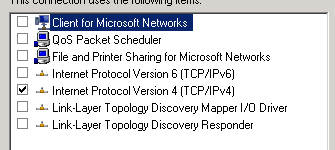
The above settings would be OK if this NIC was being used for iSCSI communications. But for client traffic ALL of the above should be checked\enabled. For DAG replication traffic TCP/IPv4, TCP/IPv6, and the two Link-Layer options should also be checked.
So to break the AD tools and cause DCDIAG errors just uncheck these options. After doing this you won’t find much help searching for the errors as I found out. So I wrote this post to hopefully help others who have a misconfigured NIC on a Windows server.
DCDIAG results
Continue reading
 Jason (Izzy) Sherry's Blog